It's Not DNS, It's Not the Firewall — It's vWAN: The Private Endpoint Asymmetric Routing Trap
An AWS VM behind a Transit Gateway can't reach an Azure Storage private endpoint over ExpressRoute. DNS is fine. The firewall has an any-any rule. The real culprit? Virtual WAN Routing Intent silently bypassing your firewall for Private Endpoint traffic — and causing asymmetric routing.
Howdy Folks,
Let’s paint a realistic picture. You’ve got a customer with a hybrid setup — an AWS VM, connected through a Transit Gateway, reaching into Azure over ExpressRoute. Somewhere on the Azure side, there’s a Storage Account locked down behind a Private Endpoint. Simple enough, right? Private Link exists specifically so this kind of cross-cloud, cross-network access can happen securely without anything touching the public internet.
Except it doesn’t work. The connection just… hangs. And then times out.
Sound familiar? If you’ve spent any time around hybrid networking, your instincts immediately go to the two usual suspects:
- “It’s probably DNS.” It’s always DNS. Until it isn’t.
- “It’s probably the firewall blocking it.” Check the rules, add an allow-all if you have to, see if it clears up.
In this post, I’ll walk you through a real troubleshooting scenario that burned through both of those theories before landing on the actual root cause — a frustrating, easy-to-miss Azure Virtual WAN (vWAN) behavior involving Routing Intent and Private Endpoints. If you’re running ExpressRoute or VPN into a secured vWAN hub and you have Private Endpoints in your spoke VNets, this one is worth bookmarking, because it will bite you eventually.
Let’s dive in!
The Setup
Here’s the environment we were troubleshooting:
- An AWS VM, reachable from an on-premises-style network via an AWS Transit Gateway.
- Connectivity from that AWS environment into Azure via ExpressRoute (or an equivalent cross-cloud private connection landing on the on-premises side of the Azure network).
- An Azure Virtual WAN with a secured virtual hub — meaning Azure Firewall is deployed in the hub and Routing Intent is configured to inspect private (and/or internet) traffic.
- A Storage Account with a Private Endpoint deployed into a spoke VNet connected to that vWAN hub.
- An “any-any” allow rule on the Azure Firewall (a troubleshooting measure — not something you’d normally leave in production, but a useful way to rule the firewall in or out as the cause).
1
2
3
4
5
6
7
8
9
10
11
12
13
14
15
16
17
18
19
20
                         ┌─────────────────────────────┐
                         │   Azure Virtual WAN Hub     │
  AWS VM                 │   (Secured Hub)             │
    │                    │                             │
    │ Transit Gateway    │   ┌───────────────────────┐ │
    │                    │   │   Azure Firewall      │ │
    └── ExpressRoute ───┼──▶ │  (Routing Intent next│ │
                         │   │   hop for RFC1918)    | │
                         │   └───────────────────────┘ │
                         │              │              │
                         └──────────────┼──────────────┘
                                        │
                                        ▼
                         ┌─────────────────────────────┐
                         │   Spoke VNet                │
                         │   ┌───────────────────────  │
                         │   │ Private Endpoint      │ │
                         │   │ (Storage Account)     │ │
                         │   └───────────────────────┘ │
                         └─────────────────────────────┘
The Symptoms
Here’s what made this one genuinely confusing:
- The connection from the AWS VM to the storage account’s private endpoint times out. No RST, no immediate rejection — just a hang until the client gives up.
- DNS resolution was fine. The storage account’s FQDN resolved correctly to the private endpoint’s private IP address from the AWS side. Not a DNS problem.
- The firewall had an any-any rule, and yet nothing on port 443 ever showed up in the firewall logs for this traffic. ICMP (ping) traffic traversing the same general path did show up in the firewall logs — confirming the firewall itself was reachable and logging correctly — but the storage account traffic was a ghost. It never arrived.
- The same storage account was reachable from a point-to-site/VPN connection, and from inside Azure itself (e.g., a VM in a peered VNet). So the private endpoint, the storage account’s networking configuration, and DNS were all demonstrably fine. The problem was specific to the ExpressRoute/Transit Gateway path.
This combination of symptoms is what sends most of us down the wrong path. “Nothing shows up in the firewall” feels like the firewall is silently eating the traffic. It’s tempting to start rewriting firewall rules, checking NSGs, re-checking route tables on the spoke, and generally assuming the problem is somewhere between “firewall” and “misconfiguration.” It isn’t a DNS problem. It isn’t a firewall rule problem.
It’s freaking vWAN shenanigans.
The Investigation (And the Dead Ends)
Let’s walk through what gets ruled out, in order, because the order matters for anyone hitting this in the future:
- DNS — ruled out. The FQDN resolves to the private endpoint’s private IP from the AWS side, every time.
- NSGs on the private endpoint subnet — ruled out. No deny rules logged, and NSGs weren’t even in play for private endpoint traffic unless explicitly enabled (more on that shortly).
- Azure Firewall rules — ruled out, specifically because of the any-any rule. If the firewall were blocking the traffic on purpose, you’d expect a deny log entry. There wasn’t one. There wasn’t an allow log entry either. The traffic simply never reached the firewall at all for inspection.
- Storage account firewall / private endpoint configuration — ruled out, because the same storage account was reachable fine over VPN and from inside Azure.
That last point is the big clue. If DNS, NSGs, the storage account, and the private endpoint were all fine for every other path, but specifically broken for the ExpressRoute → vWAN hub → spoke path, the problem had to be something specific to how that one hub is routing private endpoint traffic.
That’s when effective routes came into the picture. Pulling the effective routes on the private endpoint’s NIC (or via Azure Firewall’s effective routes, and Network Watcher’s IP flow verify) showed something that didn’t match the mental model most of us carry around for secured vWAN hubs: traffic destined for the private endpoint from on-premises wasn’t being sent to the firewall at all. It was taking a direct path. Meanwhile, the spoke VNet’s outbound traffic (the return leg, heading back toward on-premises) was still being forwarded to the firewall, per Routing Intent’s default behavior for RFC1918 traffic.
Two different paths, in two different directions, for the same conversation. That’s the textbook definition of asymmetric routing — and it’s exactly why almost nothing showed up where you’d expect it to.
The Root Cause: Routing Intent Has a Private Endpoint Exception
Here’s the part that’s genuinely easy to miss, straight from Microsoft’s own documentation on configuring Virtual WAN hub routing policies:
If you’re using Private Endpoints deployed in Virtual Networks connected to the Virtual Hub, traffic from on-premises destined for Private Endpoints deployed in Virtual Networks connected to the Virtual WAN hub by default bypasses the routing intent next hop (Azure Firewall, NVA, or SaaS). However, this results in asymmetric routing (which can lead to loss of connectivity between on-premises and Private Endpoints) as Private Endpoints in Spoke Virtual Networks forward on-premises traffic to the Firewall. To ensure routing symmetry, enable Route Table network policies for private endpoints on the subnets where Private Endpoints are deployed. Configuring /32 routes corresponding to Private Endpoint private IP addresses in the Private Traffic text box will not ensure traffic symmetry when private routing policies are configured on the hub.
Let’s unpack why this happens, because it’s genuinely a Virtual WAN-specific quirk and not something that’s obvious if your mental model comes from traditional hub-spoke VNet peering with UDRs.
Why the bypass exists in the first place
When you configure Routing Intent on a Virtual WAN hub, Azure programs the hub’s defaultRouteTable so that private (RFC1918) traffic and/or internet-bound traffic gets next-hopped to your security appliance — Azure Firewall, a third-party NVA, or a SaaS security provider. This is the entire point of a secured virtual hub: inspect everything.
Private Endpoints, however, are special-cased. Each private endpoint gets an implicit, high-priority /32 host route injected automatically so that traffic can reach it directly — this is a long-standing Private Link behavior independent of Virtual WAN, designed to guarantee PE reachability by default. In a secured vWAN hub, that same /32 behavior wins by default over the hub’s Routing Intent next hop. The result: on-premises traffic destined for the private endpoint’s /32 address goes straight to the spoke, completely skipping the firewall.
Why that breaks things
The spoke VNet hosting the private endpoint doesn’t know (or care) that the inbound request bypassed the firewall. Its own outbound route table — populated by Routing Intent’s defaultRouteTable propagation — still sends return traffic for RFC1918 destinations (i.e., back toward on-premises) via the firewall, because that’s the whole point of Routing Intent: inspect traffic in both directions.
So you end up with:
- On-premises → Private Endpoint: direct path, bypassing the firewall entirely.
- Private Endpoint’s spoke → On-premises: routed via the firewall, because the spoke’s effective routes still say “send RFC1918 traffic to the firewall.”
1
2
3
4
5
6
7
8
9
10
11
12
13
14
15
16
17
18
19
20
21
22
23
24
BEFORE (broken — asymmetric routing)
======================================

  AWS VM                                  Spoke VNet (Private Endpoint)
    │                                              │
    │  ── Forward: direct, bypasses Firewall ────▶ │
    │                                              │
    │  ◀── Return: forced via Firewall ─────────── │
    │        (Firewall never saw the forward leg,  │
    │         reply gets dropped / connection hangs)│
    ▼                                              ▼
  Timeout                                    Timeout


AFTER (fixed — symmetric routing)
======================================

  AWS VM                Azure Firewall              Spoke VNet (PE)
    │                         │                             │
    │ ── Forward ──────────▶ │ ── Forward ──────────────▶ │
    │                         │                             │
    │ ◀── Return ─────────── │ ◀── Return ──────────────  │
    ▼                        ▼                            ▼
  Connects                Inspects both legs           Responds
A stateful firewall (or most NVAs) needs to see both legs of the conversation to track the session. If it only ever sees the return leg of a TCP handshake it never initiated or inspected, that packet has nowhere sensible to go — it gets dropped. From the client’s point of view, that just looks like a hang, then a timeout. No firewall deny log, because the firewall never classified it as a denied flow — it just never got a matching session for a packet showing up out of nowhere.
This also explains the “ping shows up, nothing else does” symptom: general ICMP tests to other symmetric destinations traverse the firewall correctly in both directions (proving the any-any rule and the firewall itself are working fine), while private endpoint traffic specifically never reaches the firewall for the forward leg at all — because it was never supposed to, by design.
This is the key insight: the firewall isn’t broken, and it isn’t blocking anything on purpose. The traffic is being deliberately routed around it in one direction only, by Virtual WAN’s own Private Endpoint exception.
The Fix: Route Table Network Policies on the Private Endpoint Subnet
The official guidance is to enable Route Table network policies on the subnet where your private endpoints are deployed. This overrides the implicit “always bypass, always direct” /32 behavior and makes the private endpoint’s routing subject to the subnet’s associated route table — which, in a Routing Intent-enabled hub, should already have that RFC1918 default route pointing at the firewall.
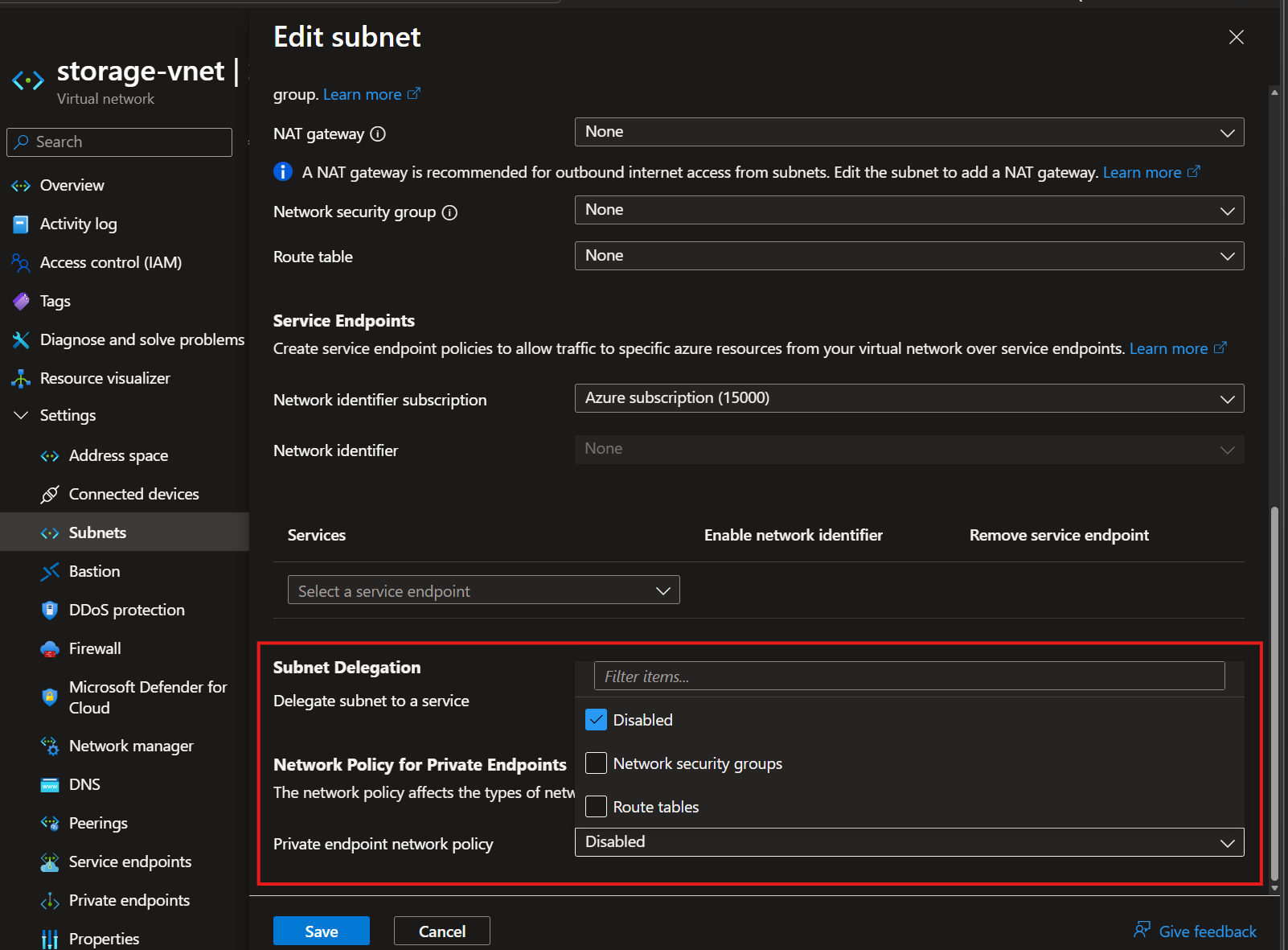 The broken state:
 Private endpoint network policy is set to Disabled on the subnet hosting the private endpoint — this is what lets on-premises traffic bypass the firewall entirely.
Important: Per Microsoft’s own documentation, adding /32 routes for your private endpoint IPs into the Routing Intent Private Traffic text box does not fix this. That configuration affects the hub’s routing behavior for traffic in general — it does not override the private endpoint subnet’s own bypass behavior. You have to fix this at the subnet level.
Step 1: Check the current subnet configuration
1
2
3
4
5
6
az network vnet subnet show \
  --resource-group rg-spoke-storage \
  --vnet-name vnet-spoke-storage \
  --name snet-private-endpoints \
  --query privateEndpointNetworkPolicies \
  --output tsv
If this comes back as Disabled (the default for most subnets historically used for private endpoints), that’s your confirmation.
Step 2: Enable Route Table network policies with Bicep
The privateEndpointNetworkPolicies property on Microsoft.Network/virtualNetworks/subnets accepts four values: Disabled, Enabled, NetworkSecurityGroupEnabled, or RouteTableEnabled. For this scenario, you want at minimum RouteTableEnabled — or Enabled if you also want NSGs to apply to private endpoint traffic (worth doing anyway, since Disabled means NSGs on that subnet are silently ignored for the PE too).
1
2
3
4
5
6
7
8
9
10
11
12
13
14
15
16
17
18
19
20
21
22
23
@description('The route table that enforces symmetric routing for Private Endpoint traffic (associated with the vWAN hub routing intent default route table via gateway route propagation).')
resource peRouteTable 'Microsoft.Network/routeTables@2024-05-01' existing = {
  name: 'rt-spoke-storage-pe'
}

resource vnet 'Microsoft.Network/virtualNetworks@2024-05-01' existing = {
  name: 'vnet-spoke-storage'
}

resource privateEndpointSubnet 'Microsoft.Network/virtualNetworks/subnets@2024-05-01' = {
  parent: vnet
  name: 'snet-private-endpoints'
  properties: {
    addressPrefix: '10.20.1.0/27'
    // RouteTableEnabled forces PE traffic to honor the subnet's route table instead
    // of the implicit, always-bypass /32 private endpoint route.
    // Use 'Enabled' instead if you also want NSGs applied to PE traffic.
    privateEndpointNetworkPolicies: 'RouteTableEnabled'
    routeTable: {
      id: peRouteTable.id
    }
  }
}
Note: You don’t strictly need an explicit route for the private endpoint’s own /32 address in this route table. What matters is that the route table your subnet is associated with correctly reflects the routes that Routing Intent has propagated into the hub’s
defaultRouteTable— typically an RFC1918 aggregate route pointing at the firewall’s private IP as next hop. Make sure “Propagate Gateway Routes” is set toYeson this route table, otherwise it won’t learn those routes from Virtual WAN at all.
Step 3: Verify effective routes changed
After deployment, re-check the private endpoint NIC’s effective routes:
1
2
3
4
az network nic show-effective-route-table \
  --resource-group rg-spoke-storage \
  --name <private-endpoint-nic-name> \
  --output table
Before the fix, you’d expect to see the private endpoint’s /32 route with a next hop type like InterfaceEndpoint or similar, taking priority regardless of the subnet’s route table. After enabling RouteTableEnabled (or Enabled) and associating the correct route table, the effective route for on-premises-originated traffic destined for RFC1918 space should now reflect the firewall’s private IP as the next hop — matching the direction the return traffic was already taking.
Step 4: Re-test and confirm symmetry in the firewall logs
From the AWS VM, re-test connectivity to the storage account over port 443. This time, you should see both legs of the conversation logged by Azure Firewall — the inbound connection attempt and the response — because the firewall is now inspecting the full, symmetric round trip.
Things to Consider
- This is specific to secured Virtual WAN hubs with Routing Intent. If you’re using traditional hub-spoke VNet peering with your own UDRs (no Virtual WAN, no Routing Intent), private endpoint routing behaves differently — UDRs on the PE subnet have always been able to override the default PE route, provided network policies were enabled the normal way.
EnabledvsRouteTableEnabled: if you only enableRouteTableEnabled, NSGs still won’t apply to traffic to/from the private endpoint on that subnet. If you want both UDR and NSG enforcement (generally a good idea for private endpoint subnets), useEnabled.- Check “Propagate Gateway Routes” on every route table in the path. If it’s not enabled, your spoke won’t learn the routes Routing Intent is propagating, and you’ll be troubleshooting a second, related-but-different routing gap.
- This also applies to Encrypted ExpressRoute with Private Routing Policies — if you’re using that feature, double-check your firewall has rules allowing traffic between the Virtual WAN site-to-site VPN gateway’s private IP tunnel endpoint and the on-premises VPN device, since that’s a related (but separate) gotcha documented alongside this one.
- Test in a non-production hub first. Changing
privateEndpointNetworkPolicieson a subnet that already has private endpoints deployed is a disruptive change — plan a maintenance window.
Useful References
- How to configure Virtual WAN hub routing policies (Routing Intent) — Microsoft Learn
- About virtual hub routing — Microsoft Learn
- Manage network policies for private endpoints — Microsoft Learn
- What is a private endpoint? — Microsoft Learn
- Azure Virtual WAN overview — Microsoft Learn
- Microsoft.Network/virtualNetworks/subnets Bicep reference — Microsoft Learn
So, to recap: it wasn’t DNS. It wasn’t the firewall rules. It was Virtual WAN quietly deciding that private endpoint traffic deserves a special, firewall-bypassing shortcut — and then not telling the return path about it. This is a game changer once you know to look for it, and genuinely painful if you don’t, because every obvious signal (DNS resolves fine, firewall has an any-any rule, nothing’s in the logs) points you away from the real cause.
If you’re running Private Endpoints behind a secured Virtual WAN hub and connecting in from anywhere — on-premises, another cloud, doesn’t matter — check your privateEndpointNetworkPolicies setting now, before you’re debugging a 2 a.m. outage. Hope this will help someone in need.
Until next time…! Feel free to reach out if you have any questions or if you’ve hit a variation of this one — I suspect there are a lot of you out there who’ve lost an afternoon to exactly this.