Azure Application Gateway WAF Exceptions List - Surgical False-Positive Tuning Finally Arrives
Howdy Folks,
If you’ve run Azure Application Gateway WAF in anything resembling production, you’ve lived this story. You flip the managed ruleset from Detection to Prevention, feel great about your security posture for about 20 minutes, and then the Teams messages start rolling in. Your mobile app’s /login endpoint is throwing 403s. A trusted partner’s API payload is tripping a SQL injection signature. A session cookie full of random base64 looks just enough like an attack that the Core Rule Set slams the door shut.
Sound familiar?
For years, the tools we had to deal with this were a bit of a blunt instrument. And that’s exactly the gap the WAF Exceptions List is here to close. In this post, I’ll walk you through what it is, the very real problem it solves, how it differs from exclusions and custom rules (a distinction that trips up even seasoned engineers), and how to deploy it with Bicep, PowerShell, and the Azure CLI.
Let’s dive in!
Exceptions are a precision tool. Every exception you add is a slice of inspection you’ve chosen to switch off for matching traffic - so the whole game is keeping the match criteria tight and the rule scope narrow. Review them like firewall rules: deliberately, and with suspicion.
The Gap: What We Were Stuck With Before
Let’s be honest about where we were. When a managed rule generated a false positive, you had three imperfect options, and every one of them forced a compromise:
Disable the offending rule entirely. Easy, and catastrophic. If rule
942100(a SQL injection signature) causes a false positive on one endpoint, disabling it switches off that protection for every request to every path behind that policy. You’ve traded one annoyed developer for a gaping hole in your coverage.Use exclusions. Exclusions are great, but they’re scoped to a specific element within a request - a named header, a cookie, a query-string argument. They let WAF skip inspection of that element while still inspecting the rest of the request. Powerful, but they don’t help when the problem isn’t a single field - when it’s a whole class of requests to a known-good URI or from a trusted IP range that you want to let past a specific rule.
Write a custom Allow rule. This is the nuclear option. A custom rule with the Allow action causes the request to bypass the Default Rule Set (DRS), the Core Rule Set (CRS), and the Bot Protection ruleset - all of them, all at once. It’s absolute and can’t be selectively applied. Great for a fully trusted partner IP range; wildly over-permissive if all you wanted was to silence one noisy rule.
So the gap was this: there was no clean, request-level way to say “for this traffic, skip this specific rule (or rule group), but keep everything else fully armed.”
That’s precisely what exceptions give us.
Exceptions let you bypass WAF inspection for an entire request, but only against the specific rules, rule groups, or rulesets you nominate - while every other protection continues to run on that same request.
Exclusions vs. Exceptions vs. Custom Rules - Get This Right
This is the part people get wrong, so let’s nail it down. Microsoft gives us three mechanisms to safely allow traffic, and they operate at completely different granularities. Picking the wrong one is how you either keep getting paged or accidentally punch a hole in your WAF.
| Mechanism | What it skips | Scope of the bypass | Best for |
|---|---|---|---|
| Exclusion | A specific element of a request (header, cookie, query arg) | Rest of the request is still fully inspected | A single field that reliably triggers false positives (e.g. a session cookie full of random characters) |
| Exception | The entire request, but only against nominated rules / rule groups / rulesets | All other rules, groups, and rulesets still run | Letting known-good traffic past one or more problematic signatures while keeping the rest of the WAF armed |
| Custom rule (Allow) | The entire request, against DRS, CRS, and Bot Protection | Absolute - none of those rulesets evaluate the request | Fully trusted sources (e.g. a partner’s IP range) where you accept disabling signature/anomaly detection |
A few nuances that matter at the expert level:
- With a custom Allow rule, the bypass of DRS/CRS/Bot Protection is absolute and non-selective. Once it triggers, those rulesets simply don’t run. The one thing that does still run is the HTTP DDoS protection ruleset - volumetric and flood-style checks keep applying even when everything else is skipped.
- Exceptions can be applied to DRS, CRS, Bot Protection, and even the HTTP DDoS ruleset - but surgically, one rule or group at a time. This is the fine-grained control that was missing.
Here’s the mental model I use:
1
2
3
4
5
6
7
8
9
10
11
                        Want to allow some traffic through WAF?
                                        |
        +-------------------------------+-------------------------------+
        |                               |                               |
   Skip ONE field                 Skip SPECIFIC rules            Skip ALL signature
   (header/cookie/arg),           for a whole request,          detection for fully
   inspect the rest               keep the rest armed           trusted traffic
        |                               |                               |
        v                               v                               v
    EXCLUSION                       EXCEPTION                   CUSTOM ALLOW RULE
                                                               (DDoS ruleset still runs)
If you take one thing away: exceptions sit between exclusions and custom Allow rules - broader than an exclusion (whole request, not one field), but far narrower than a custom Allow (nominated rules, not everything).
Prerequisites and Guardrails
Before you reach for exceptions, check these off:
- Application Gateway v2 - exceptions apply to the v2 SKU.
- Next-generation WAF engine - only the next-gen engine supports exceptions.
- Ruleset version CRS 3.2, DRS 2.1, or later. If you’re on an older managed ruleset, you’ll need to upgrade your CRS or DRS ruleset version first.
And the limits you need to design around:
| Limit | Value |
|---|---|
| Exceptions per WAF policy | 60 |
| Exceptions per Application Gateway (sum across all associated policies) | 60 total |
| IP addresses within a single exception | up to 600 |
| URIs within a single exception | up to 10 |
| Request headers within a single exception | up to 10 |
The per-exception limits are mutually exclusive buckets - a single exception holds up to 600 IPs or up to 10 URIs or up to 10 headers, depending on the match variable you choose. Plan your consolidation accordingly.
How an Exception Is Defined
Every exception is built from two parts:
1. The request attributes that identify which traffic should bypass evaluation. Supported match variables are:
- Request URI
- Remote IP address
- Request header name and value
You match these using one of the following operators:
- Equals - exact match (e.g. header
bearerTokenmatchesbearerTokenexactly) - Starts with - value begins with the selector
- Ends with - value ends with the selector
- Contains - value contains the selector
- IP Match - matches one or more IP addresses
2. The scope - what the exception actually bypasses. You can scope it to:
- A specific rule
- A rule group (provide the
ruleGroupName) - An entire managed ruleset
Always make exceptions as narrow as possible. A broad exception - say, bypassing an entire ruleset for a wide IP range - can quietly re-open the very attack surface your WAF is meant to cover. Prefer per-rule exceptions wherever you can. To bypass a whole rule group, supply
ruleGroupName; only use therulesparameter when you’re narrowing down to specific rules within that group.
Worked Example
Let’s use the canonical scenario from the docs and make it concrete. Suppose requests to /login.php and /logout.php keep tripping the SQL injection rule group (REQUEST-942-APPLICATION-ATTACK-SQLI) in DRS 2.1. These are legitimate auth endpoints, the false positives are well understood, and you want them to skip just the SQLi rules - while XSS, LFI, RCE, bot protection and everything else keep inspecting them.
Here’s how to configure that across the portal, Bicep, PowerShell, and the Azure CLI.
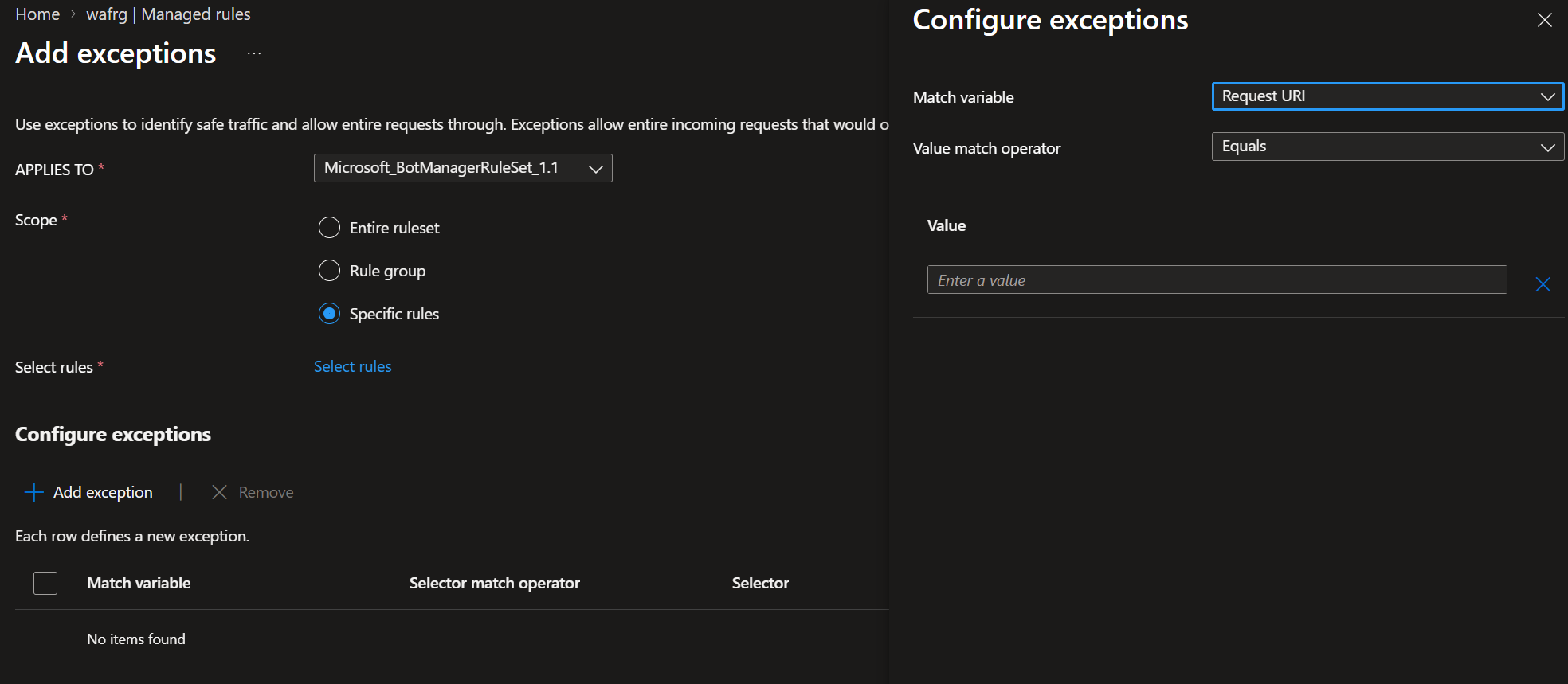
Option 1: Azure Portal
- Go to the WAF policy where you want to add exceptions.
- Under Settings, select Managed rules.
- On the Exceptions tab, select Add exceptions.
- In Applies to, choose the DRS ruleset (e.g.
Microsoft_DefaultRuleSet_2.1) and select the scope - rule group, specific rules, or the entire ruleset. - Select Add exception and configure the match variable, value match operator, and the values.
- Select Add, then Save.
The new exception then appears on the Exceptions tab.
Option 2: Bicep (Infrastructure as Code)
Bicep is my preferred IaC language, and this is where exceptions really shine - you codify the false-positive tuning right alongside the policy, so it’s reviewed, version-controlled, and reproducible across environments.
1
2
3
4
5
6
7
8
9
10
11
12
13
14
15
16
17
18
19
20
21
22
23
24
25
26
27
28
29
30
31
32
33
34
35
36
37
38
39
40
41
42
43
44
45
46
47
@description('Name of the WAF policy')
param wafPolicyName string = 'waf-appgw-prod'

@description('Location for the WAF policy')
param location string = resourceGroup().location

resource wafPolicy 'Microsoft.Network/ApplicationGatewayWebApplicationFirewallPolicies@2024-05-01' = {
  name: wafPolicyName
  location: location
  properties: {
    policySettings: {
      state: 'Enabled'
      mode: 'Prevention'
    }
    managedRules: {
      // The exception: bypass ONLY the SQLi rule group for /login.php and /logout.php
      exceptions: [
        {
          matchVariable: 'RequestURI'
          valueMatchOperator: 'Equals'
          values: [
            'login.php'
            'logout.php'
          ]
          exceptionManagedRuleSets: [
            {
              ruleSetType: 'Microsoft_DefaultRuleSet'
              ruleSetVersion: '2.1'
              ruleGroups: [
                {
                  ruleGroupName: 'REQUEST-942-APPLICATION-ATTACK-SQLI'
                  // Omit 'rules' to bypass the whole group; add ruleIds to narrow further
                }
              ]
            }
          ]
        }
      ]
      managedRuleSets: [
        {
          ruleSetType: 'Microsoft_DefaultRuleSet'
          ruleSetVersion: '2.1'
        }
      ]
    }
  }
}
Narrowing to a single rule: to bypass just rule
942100instead of the whole 942 group, add arulesarray inside the rule group, e.g.rules: [ { ruleId: '942100' } ]. Narrow is always safer.
A quick deploy:
1
2
3
4
az deployment group create \
  --resource-group "myResourceGroup" \
  --template-file ./waf-policy.bicep \
  --parameters wafPolicyName='waf-appgw-prod'
Option 3: PowerShell
1
2
3
4
5
6
7
8
9
10
11
12
13
14
15
16
17
18
19
20
$ruleGroupEntry = New-AzApplicationGatewayFirewallPolicyExclusionManagedRuleGroup `
  -RuleGroupName 'REQUEST-942-APPLICATION-ATTACK-SQLI'

$exclusionManagedRuleSet = New-AzApplicationGatewayFirewallPolicyExclusionManagedRuleSet `
  -RuleSetType 'Microsoft_DefaultRuleSet' `
  -RuleSetVersion '2.1' `
  -RuleGroup $ruleGroupEntry

$exceptionEntry = New-AzApplicationGatewayFirewallPolicyException `
  -MatchVariable "RequestURI" `
  -ValueMatchOperator 'Equals' `
  -Values login.php, logout.php `
  -ExceptionManagedRuleSet $exclusionManagedRuleSet

$wafPolicy = Get-AzApplicationGatewayFirewallPolicy `
  -Name $wafPolicyName `
  -ResourceGroupName $resourceGroupName

$wafPolicy.ManagedRules[0].Exceptions.Add($exceptionEntry)
$wafPolicy | Set-AzApplicationGatewayFirewallPolicy
Option 4: Azure CLI
1
2
3
4
5
6
7
az network application-gateway waf-policy managed-rule exception add \
  -g "myResourceGroup" \
  --policy-name "myWAF" \
  --match-variable "RequestURI" \
  --value-operator Equals \
  --values "login.php" "default.aspx" "account/images" \
  --rule-sets [0].rule-set-type=Microsoft_Default_Ruleset [0].rule-set-version=2.1
When to Use Exceptions - and When NOT To
Because I’ve seen these features misused, let me be blunt about the boundaries.
Use exceptions when:
- A known-good class of requests (a URI, an IP range, a header value) reliably trips one or a few specific rules, and you want to keep every other protection active on that traffic.
- You need tuning that’s auditable and codified - exceptions live in the policy’s managed rules and deploy cleanly via IaC.
- You want finer control than a custom Allow rule but broader reach than an exclusion (whole request vs. a single field).
Do NOT use exceptions when:
- You only need to skip one element of a request (a cookie or query arg) - that’s an exclusion, and it’s the tighter, correct tool.
- You fully trust the source and want to waive all signature/anomaly detection - that’s a custom Allow rule (and remember, HTTP DDoS protection still applies).
- You’re tempted to scope an exception to an entire ruleset for a broad IP range to “make the noise stop.” That’s how you quietly disarm your WAF. If you find yourself reaching for that, stop and investigate the actual false positive instead.
Honest trade-off: exceptions reduce false positives by bypassing inspection. Every exception is, by definition, a small piece of your attack surface you’ve chosen not to inspect for that traffic. The safety comes entirely from keeping the match criteria tight and the rule scope narrow. Review them like you’d review firewall rules - periodically, and with suspicion.
A Few Operational Tips
- Tune in Detection mode first. Run the ruleset in Detection, mine your WAF logs (
AzureDiagnostics/ the resource-specificAGWFirewallLogstable) for the exactruleIdandruleGroupfiring, then write the narrowest exception that covers it. - Prefer per-rule over per-group, and per-group over per-ruleset. Always climb the smallest rung of the ladder that solves the problem.
- Mind the 60-exception ceiling per gateway. It’s a hard design constraint when you consolidate many apps behind one Application Gateway. Consolidate values within a single exception (up to 600 IPs / 10 URIs / 10 headers) before you spend another exception slot.
- Revisit after app changes. An exception written for
/login.phptoday may be meaningless - or dangerous - after a framework migration. Treat them as living config.
Wrapping Up
WAF exceptions fill a genuinely annoying gap. For years we were stuck choosing between an exclusion that was too narrow (one field) and a custom Allow rule that was too broad (every ruleset, gone). Exceptions give us the middle ground we actually needed: bypass the request against just the rules causing pain, and leave the rest of the WAF doing its job.
If you’ve ever spent a Friday afternoon chasing a single noisy CRS rule across an entire policy, you’re going to appreciate this one. Just keep every exception as narrow as the problem it solves, and review them regularly.
For the official details and limits, see the Microsoft Learn doc: Azure Application Gateway WAF exceptions list. And for the broader picture, the Azure Web Application Firewall on Application Gateway overview is well worth a read.
Hope this helps someone in need. Feel free to reach out if you have any questions.
Until next time…!