Self-Service Landing Zone Vending — A Sample Web App + GitHub Copilot Agent Pattern
How to turn a single Bicep template into a self-service landing zone vending experience — with a small web app for the form, GitHub for storage, and a Copilot coding agent that opens the PR for you.
Howdy Folks,
It’s been some time since I last delved into platform engineering territory, and this one comes straight out of a weekend hack. A few customers I’ve been working with have all hit the same wall — they have beautiful, opinionated landing zone Bicep templates authored by their platform team, but the only way to actually get a landing zone is to raise a ticket, wait for someone to hand-craft a .bicepparam file, and pray the values are correct.
Sound familiar?
In this post, I’ll walk you through a small sample app I built that turns that whole process into a self-service vending experience — without buying anything, without standing up a portal, and without writing a custom orchestrator. Just a tiny web app, a GitHub repo, and a GitHub Copilot coding agent doing the boring bits.
The full code is on GitHub: azurewithdanidu/landing-zone-deployment-agent. Feel free to clone it, rip it apart, and bend it to whatever IaC you already have. The pattern is the point — not the specific Bicep template.
Let’s dive in.
The Problem — Landing Zone Vending Without the Vending
If you’ve worked with Azure Landing Zones (the Cloud Adoption Framework reference architecture), you already know the goal: a curated, repeatable starting point for application teams so they don’t have to think about networking, identity, monitoring, or guardrails.
Microsoft’s official guidance even has a name for this — subscription vending — and there’s a dedicated reference implementation on Azure Architecture Center for it.
But here’s the thing — most organizations I see end up with one of these two patterns:
- The platform team owns everything. Application teams raise a Jira/ServiceNow ticket. Someone in the platform team copies a
.bicepparamtemplate, fills in the values, opens a PR, gets it reviewed, merges it, and triggers the pipeline. Throughput is whatever the platform team can manually push. - The platform team writes a portal. Beautiful idea, but now they own a Node.js/React app, an Azure SQL backend, an auth flow, and a four-week onboarding process for every new template change.
Neither is great. The first doesn’t scale. The second is over-engineered for what is, fundamentally, a glorified form.
What if we could get the form experience without the portal? That’s the rabbit hole I went down.
The Architecture — Three Moving Parts
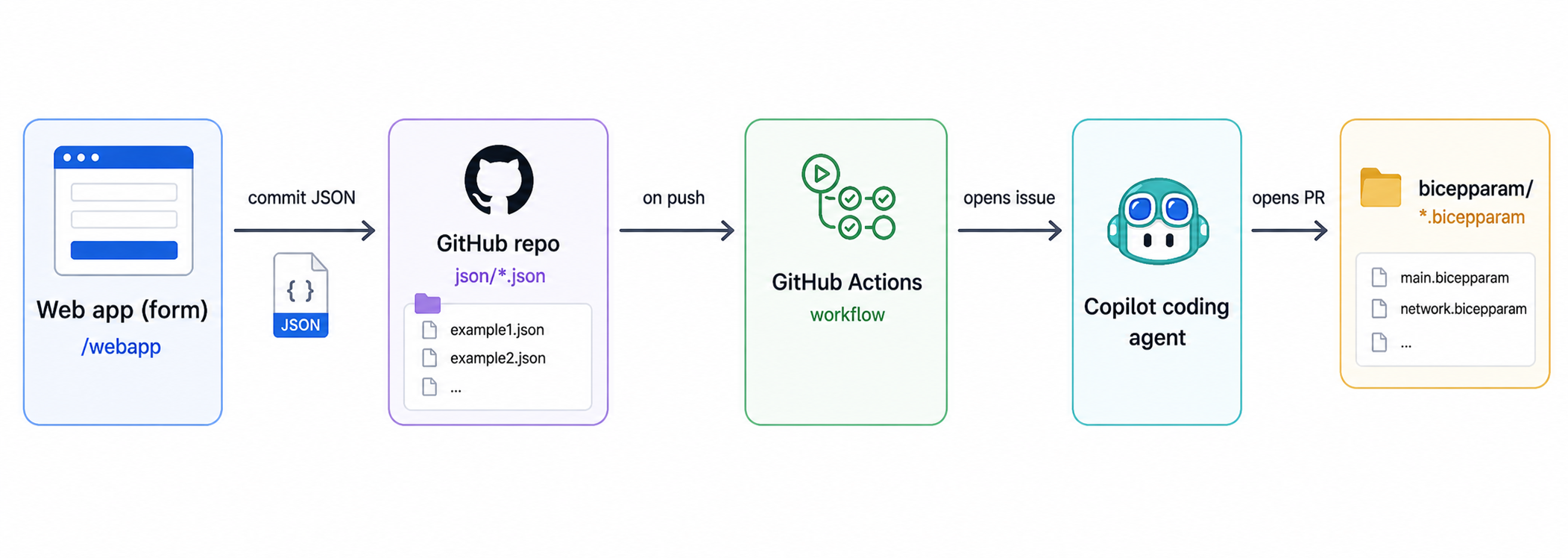
Here’s the pipeline at a glance:
Three components, each doing one thing well:
- A tiny web app that reads the Bicep template and renders a dynamic form.
- A GitHub repo that’s the single source of truth — it stores the template, the JSON, the bicepparam files, and the audit trail.
- A GitHub Copilot coding agent that watches for new JSON files and converts them into a proper
.bicepparamvia a pull request.
The genius bit isn’t any one component — it’s that GitHub is the database, the queue, and the audit log. No infrastructure to host, no secrets sprawl, no separate ticketing system.
The web app never deploys anything to Azure. It only writes a JSON file to a Git branch. Everything downstream — review, validation, deployment — runs through your normal Git workflow.
Part 1 — Why Decorate Your Bicep Template (And Why It Matters Here)
Before I show the web app, I need to make a quick detour, because this whole pattern only works if your Bicep template is introspectable.
Bicep has a beautiful set of parameter decorators that tell you everything you need to know about a parameter without ever running az deployment what-if:
1
2
3
4
5
6
7
8
9
10
11
12
13
14
15
16
17
18
19
20
21
22
23
24
25
26
@description('Name of the landing zone — used as a prefix for all resources.')
@minLength(3)
@maxLength(12)
param landingZoneName string

@description('Environment short code.')
@allowed([
  'dev'
  'test'
  'prod'
])
param environment string

@description('Azure region for the deployment.')
param location string = deployment().location

@description('Address space for the spoke VNet (CIDR).')
param vnetAddressPrefix string = '10.50.0.0/16'

@description('Deploy Azure Bastion Standard SKU into the landing zone.')
param deployBastion bool = false

@description('Tags applied to every resource.')
param tags object = {
  managedBy: 'platform-team'
}
Look what’s already there:
@description— the form label and help text.@allowed— turns into a dropdown.@minLength/@maxLength/@minValue/@maxValue— turns into client-side validation.- The type (
string/int/bool/array/object) — picks the right form input. - The default value — pre-populates the form.
@secure— turns it into a password field and skips it from logs.
This is a goldmine. Every modern Bicep template that follows Microsoft’s authoring best practices already has all of this metadata. You’re not asking your platform team to add anything new — you’re just reading what they already wrote.
So if your template is well-decorated, you get a great form for free. If it isn’t… well, this pattern gives you a very good reason to fix that.
Part 2 — The Web App (Yes, It’s Tiny)
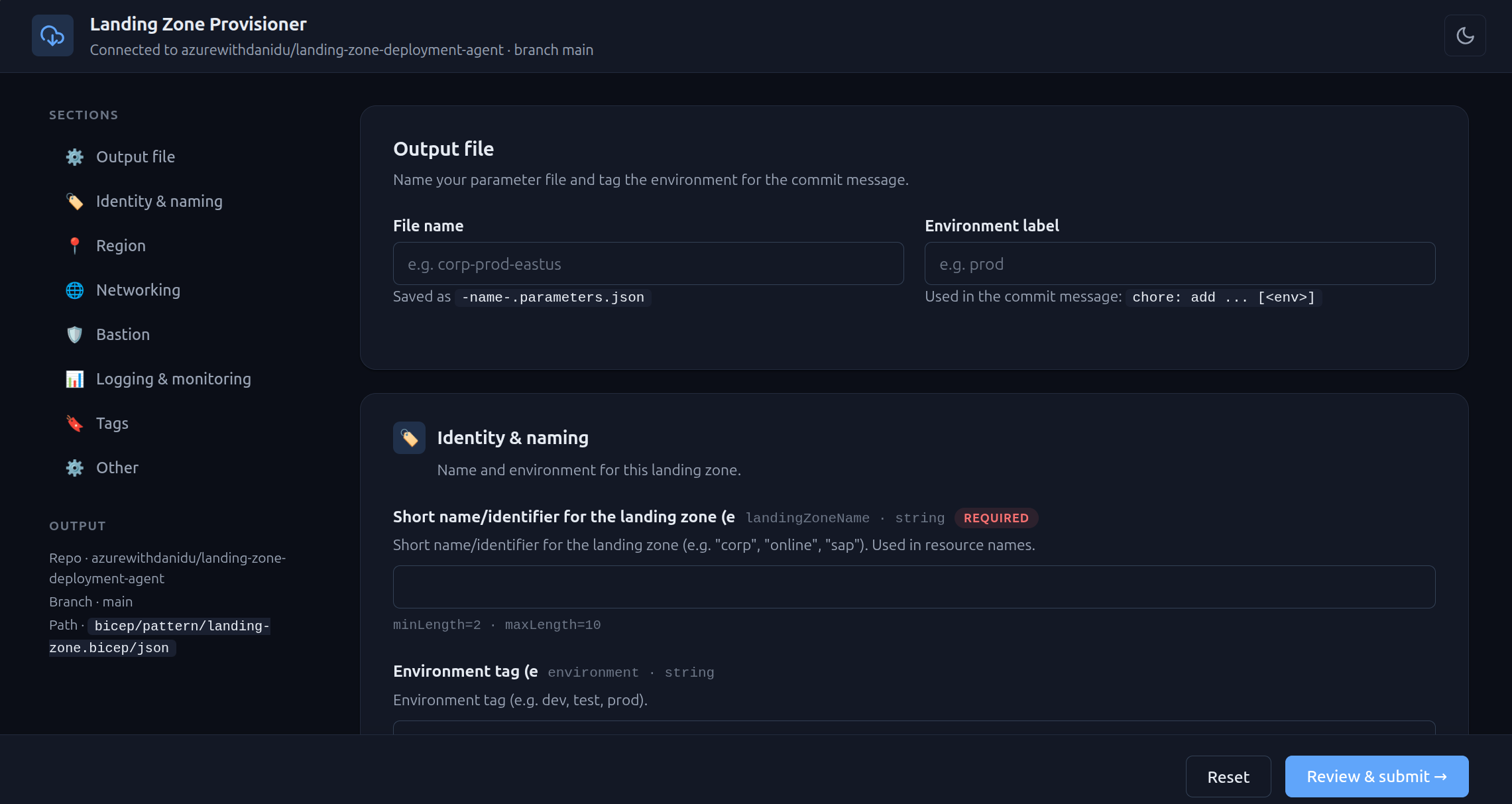
The whole web app is around 600 lines of vanilla JavaScript — no React, no Next.js, no build step. Just Node.js + Express on the server, and plain HTML/CSS/JS in the browser.
I deliberately kept it tiny. The goal isn’t to win a UI awards competition — it’s to be something a platform team can read, understand, and fork in an afternoon.
How the parser works
Here’s the heart of it — a regex-based scanner that walks the Bicep template and pulls out every param declaration along with its decorators:
1
2
3
4
5
6
7
8
9
10
11
12
13
14
15
16
17
18
19
20
21
22
23
24
25
26
27
28
29
// webapp/server/bicepParser.js (excerpt)
function parseBicepParams(source) {
  const lines = source.split(/\r?\n/);
  const params = [];
  let pendingDecorators = [];

  for (const line of lines) {
    const trimmed = line.trim();

    // Collect @description, @allowed, @minLength, etc. above the param.
    const decoMatch = trimmed.match(/^@(\w+)\s*\((.*)\)$/);
    if (decoMatch) {
      pendingDecorators.push({ name: decoMatch[1], value: decoMatch[2] });
      continue;
    }

    // param <name> <type> [= <default>]
    const paramMatch = trimmed.match(/^param\s+(\w+)\s+(\w+)(?:\s*=\s*(.+))?$/);
    if (paramMatch) {
      params.push(buildParam(paramMatch, pendingDecorators));
      pendingDecorators = [];
      continue;
    }

    // Anything else clears pending decorators (handles blank lines, comments).
    if (trimmed && !trimmed.startsWith('//')) pendingDecorators = [];
  }
  return { params, errors: [] };
}
That’s it. No Bicep CLI dependency, no AST library — just text parsing. It runs in milliseconds and handles every decorator listed in the official Bicep docs.
The Express server then exposes three small endpoints:
| Method | Route | Purpose |
|---|---|---|
GET | /api/config | Returns the configured repo, branch, and target paths |
GET | /api/template | Fetches main.bicep from GitHub, parses it, returns params |
POST | /api/submit | Validates values, builds the JSON, commits via Octokit |
Authentication uses a fine-grained GitHub Personal Access Token with Contents: read & write scoped to a single repo. The PAT lives in .env on the server — it never touches the browser. Documentation for fine-grained PATs is here on GitHub Docs.
What the user sees
The frontend reads /api/template, groups the parameters into logical sections (identity, networking, bastion, logging, tags), and renders a form. Each field gets the right input type based on the Bicep type — strings become text inputs, bool becomes a toggle, @allowed becomes a <select>, array becomes a repeater, object becomes a JSON editor.
When the user clicks Review & submit, the app:
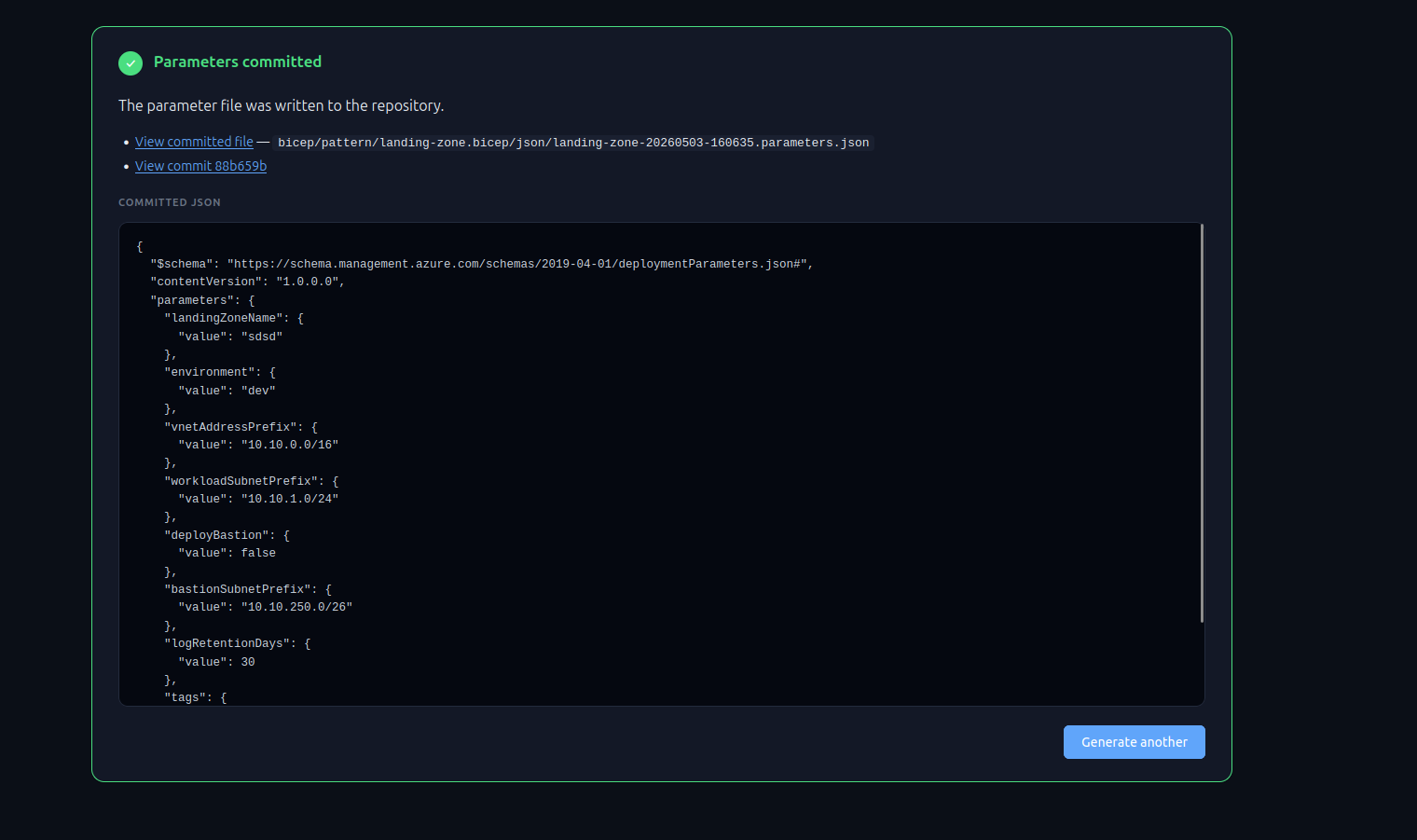
- Validates client-side.
- Re-fetches the template (in case it changed mid-session).
- Re-validates server-side using the same parser.
- Builds a standard ARM-style
*.parameters.json. - Sanitizes the filename to prevent path traversal.
- Commits it to
bicep/pattern/landing-zone.bicep/json/<name>.parameters.jsononmain.
That commit is what triggers everything downstream.
Part 3 — GitHub Actions Trigger
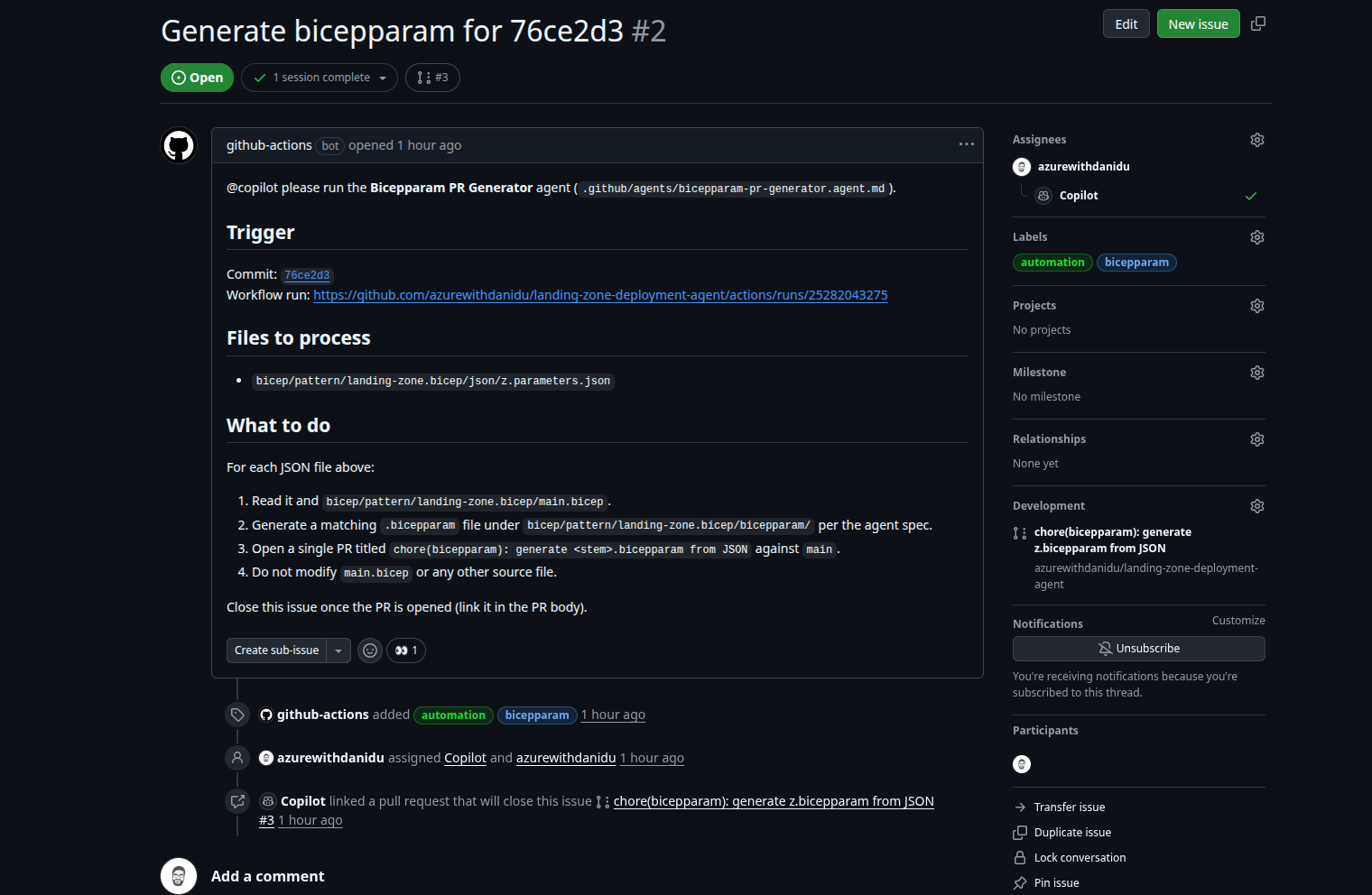
Once the JSON file lands on main, a GitHub Actions workflow fires. It’s deliberately dumb — its only job is to open an issue and mention @copilot, which hands the work off to the Copilot coding agent.
1
2
3
4
5
6
7
8
9
10
11
12
13
14
15
16
17
18
19
20
21
22
23
24
25
26
27
28
29
30
31
32
33
34
35
36
37
38
39
40
41
42
# .github/workflows/bicepparam-on-json.yml
name: Bicepparam PR on JSON change

on:
  push:
    branches: [main]
    paths:
      - 'bicep/pattern/landing-zone.bicep/json/**.parameters.json'
  workflow_dispatch:
    inputs:
      files:
        description: 'Comma-separated list of JSON files'
        required: true

permissions:
  contents: read
  issues: write
  pull-requests: write

jobs:
  open-issue:
    runs-on: ubuntu-latest
    steps:
      - uses: actions/checkout@v4

      - name: Ensure labels exist
        env:
          GH_TOKEN: $
        run: |
          gh label list | grep -qx automation || \
            gh label create automation --color 0e8a16
          gh label list | grep -qx bicepparam || \
            gh label create bicepparam --color 1d76db

      - name: Open tracking issue for Copilot
        env:
          GH_TOKEN: $
        run: |
          gh issue create \
            --title "Generate bicepparam from new JSON" \
            --label automation,bicepparam \
            --body "@copilot please run the **Bicepparam PR Generator** agent against the JSON files in this push and open a PR."
Two things to call out:
- Labels are auto-created. Every customer hits this — your shiny workflow fails on first run because
automationlabel doesn’t exist. Thegh label createstep is idempotent and saves a support ticket. - No
--assigneefor Copilot. I tried that initially and gotGraphQL: Bot does not have access to the repository (replaceActorsForAssignable). The defaultGITHUB_TOKENcan’t assign the Copilot bot. Mentioning@copilotin the issue body is enough — the coding agent picks it up. If you really want assignment, you need a separate PAT.
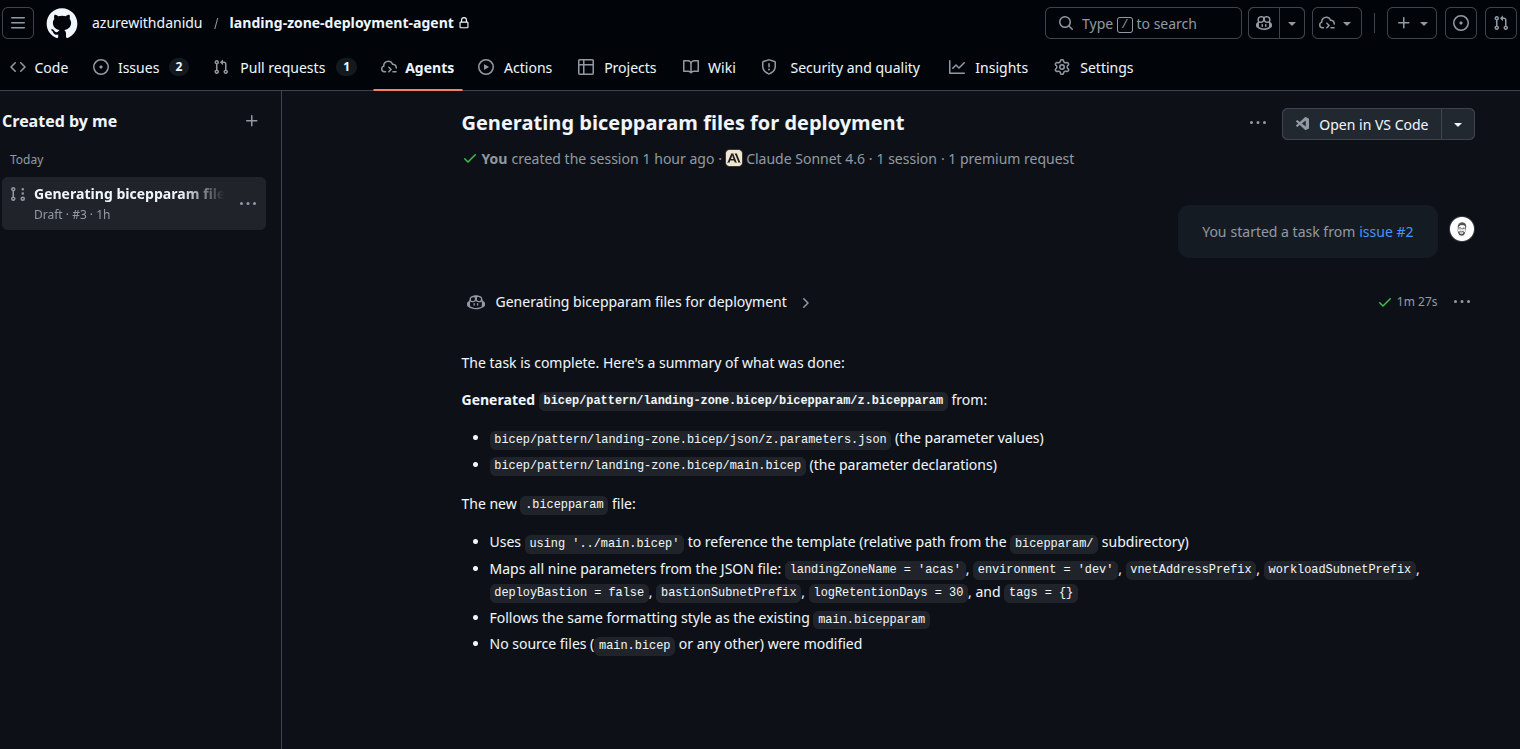
The GitHub Copilot coding agent is in public preview as of writing. You enable it in Settings → Code & automation → Copilot → Coding agent. Microsoft Learn has the latest enablement guide here.
Part 4 — The Copilot Coding Agent (The Smart Bit)
This is where it gets fun. Instead of writing a Node.js converter that takes a JSON and emits a .bicepparam, I wrote a persona for the GitHub Copilot coding agent and let it do the work.
The persona lives in .github/agents/bicepparam-pr-generator.agent.md. Here’s the relevant excerpt:
1
2
3
4
5
6
7
8
9
10
11
12
13
14
15
16
17
18
19
20
21
22
23
24
25
26
---
name: Bicepparam PR Generator
description: Convert a *.parameters.json file into a matching .bicepparam file
  for main.bicep and open a pull request.
tools: [read, edit, search, execute]
model: ["Claude Sonnet 4.5 (copilot)", "GPT-5 (copilot)"]
---

# Goal
Given a new or updated file at `bicep/pattern/landing-zone.bicep/json/<stem>.parameters.json`,
generate the equivalent `bicep/pattern/landing-zone.bicep/bicepparam/<stem>.bicepparam`
and open a PR.

# Rules
1. NEVER edit `main.bicep` or any module under `modules/`.
2. NEVER push directly to `main`. Always use a feature branch named
   `bicepparam/<stem>-<short-sha>`.
3. NEVER invent parameters — only emit values present in the JSON.
4. Use `using '../main.bicep'` syntax (the bicepparam folder is one level
   below main.bicep).
5. Validate with `az bicep build-params` if the CLI is available; if not,
   skip validation and note this in the PR description.
6. Open the PR with title:
   `chore(bicepparam): generate <stem>.bicepparam from JSON`
7. Apply labels `automation` and `bicepparam`.
8. Request review from CODEOWNERS for the bicepparam folder.
That’s it. No code. Just guardrails and intent.
When the issue mentions @copilot, the agent reads the persona, reads the new JSON, reads main.bicep to understand the parameter types and @allowed values, and emits something like:
1
2
3
4
5
6
7
8
9
10
11
12
13
// bicep/pattern/landing-zone.bicep/bicepparam/corp-prod-eastus.bicepparam
using '../main.bicep'

param landingZoneName = 'corp-prod-eastus'
param environment = 'prod'
param location = 'eastus'
param vnetAddressPrefix = '10.50.0.0/16'
param deployBastion = true
param tags = {
  managedBy: 'platform-team'
  costCentre: 'CC-12345'
  workload: 'corp-prod'
}
Then it opens a PR, tags the right reviewers, and waits for a human to merge it. The platform team is back in the loop — not as a bottleneck, but as a final reviewer.
If you want the full persona, it’s in the repo.
Why I Like This Pattern (And Where It Falls Short)
Time for the honest part. Every pattern has trade-offs.
Pros
- Tiny surface area. ~600 lines of JS, one workflow YAML, one agent persona. A platform team can read all of it in 30 minutes.
- GitHub is the system of record. Every parameter change is a commit, every conversion is a PR, every approval is a review. You get audit trail, branch protection, CODEOWNERS, and rollback for free.
- Template-agnostic. This isn’t really about landing zones. Anywhere you have a central IaC template that humans need to fill out — VM provisioning, AKS cluster vending, Storage account requests, Key Vault provisioning — this exact pattern applies. Swap
main.bicep, change the canonical group ordering in the web app, and you’re done. - No portal to maintain. No auth flow, no database, no Azure SQL, no Container App, no scaling considerations.
- The agent does the boring conversion. Writing a JSON-to-bicepparam converter that handles every type correctly is annoying. The Copilot agent reads the schema from the Bicep file and gets it right.
Cons (Be Honest)
- PAT lifecycle. The web app uses a fine-grained GitHub PAT. PATs expire — make sure you have a rotation process. Better long-term: host the web app on Azure with Managed Identity + GitHub Apps, but that’s beyond a sample.
- Single template assumption. The current sample reads one
main.bicep. Multi-template support means a template picker on the front end and routing on the server. Doable in a day, but not done. - No edit flow. The current app always creates a new JSON. To edit an existing landing zone, you’d want to load the existing parameters and pre-populate the form. On the roadmap.
- Copilot agent quotas. The coding agent has usage limits. If you’re vending 200 landing zones a day, you’ll hit them. For most platform teams provisioning 1–10 a week, it’s a non-issue.
- No deployment yet. This pipeline stops at the merged
.bicepparam. The actualaz deployment sub createis still a manual step (or another workflow). I’m planning a follow-up post on triggering OIDC-authenticated deployments on bicepparam merge. - Only as good as your Bicep template. Garbage in, garbage out. If your template has 47 undocumented
params with no decorators, the form will be ugly. This pattern is a forcing function for better template hygiene.
When To Use This Pattern (And When NOT To)
Use it when:
- You have a central IaC repo with one or more well-decorated Bicep (or Terraform — same idea) templates.
- Application teams need a guided way to request infrastructure without raising tickets.
- You have a small platform team who can review PRs but can’t author every parameter file.
- You want a self-service experience without committing to running a portal in production.
Don’t use it when:
- You’re vending hundreds of subscriptions a day — look at the official ALZ Bicep accelerator and Terraform AVM landing zone modules instead.
- Your security team requires SOC 2 / ISO 27001 / FedRAMP boundaries that a sample web app and a public-preview Copilot agent can’t satisfy.
- Your application teams want a polished, branded portal experience as part of an internal developer platform — look at Backstage or Microsoft Dev Box for that level of investment.
- Your IaC templates aren’t decorated — fix that first, then come back.
Where To Go From Here
If you want to play with the pattern:
- Clone the repo:
git clone https://github.com/azurewithdanidu/landing-zone-deployment-agent.git - Drop your own Bicep template into
bicep/pattern/<your-template>/main.bicep. - Update the path in
webapp/.env:BICEP_TEMPLATE_PATH=.... - Run
cd webapp && npm install && npm start— the form is athttp://localhost:3000. - Enable the Copilot coding agent in your repo settings.
- Push the workflow + the agent persona, and you’re vending.
The whole pipeline — web app + workflow + Copilot agent — works out of the box on the sample landing zone. Adapting it to your own templates is mostly a matter of changing the path in .env and tweaking the canonical group ordering in webapp/public/app.js (about 20 lines of JS).
I’d love to hear what you build with this. If you spin it up against your own central IaC repo, drop me a line — I’m collecting use cases for a follow-up post.
Hope this helps someone in need. Until next time…!
Feel free to reach out if you have any questions, or jump on the GitHub repo and raise an issue.