AI-Assisted AWS to Azure Migration with GitHub Copilot Agents
How I built a framework of custom GitHub Copilot agents that automate the full AWS-to-Azure migration pipeline — from live account discovery through architecture design, code refactoring, IaC generation, and deployment validation.
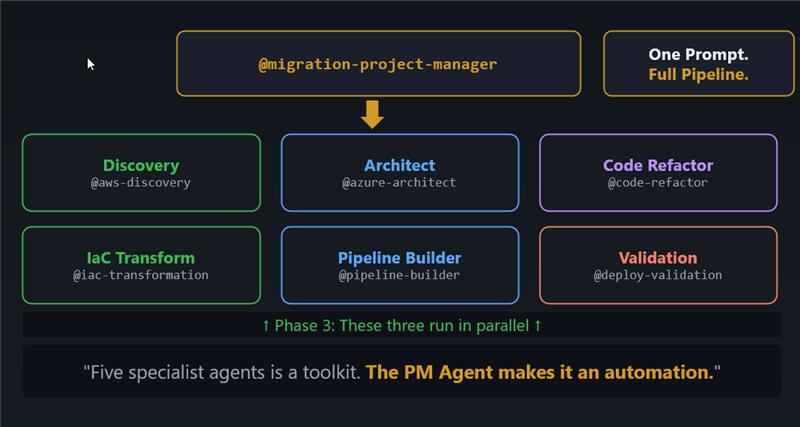
This blog post is backed by a github repository https://github.com/azurewithdanidu/ai-assisted-aws-to-azure-migration
Howdy Folks,
Cloud migrations are hard. Not because the technology is hard — Azure and AWS have well-documented service equivalents, the tooling is mature, and the patterns are well understood. Migrations are hard because of scale, consistency, and human error at each handoff. A typical AWS-to-Azure migration involves at least five distinct disciplines: infrastructure discovery, architecture design, application code refactoring, IaC generation, and CI/CD pipeline setup. Each phase is usually handled by a different person or team, and context gets lost at every boundary.
So here’s the question I kept asking myself: what if a single prompt could kick off the entire pipeline?
In this post, I’ll walk you through a framework I built using custom GitHub Copilot agents — eight purpose-built agents that run entirely inside VS Code, orchestrated by a project manager agent, covering the full migration lifecycle from a live AWS account all the way to a passing deployment validation report on Azure. No external scripts, no stitching together CLI pipelines. Just agents, MCP servers, and well-crafted instructions.
Let’s dive in.
The Problem: Migration at Scale
Let’s paint a realistic picture. Your organisation has a workload running on AWS — Lambda functions, S3 buckets, API Gateway, CloudFormation stacks. Management has decided to migrate to Azure. You have a team of engineers, a deadline, and a long list of decisions to make:
- Which AWS services map to which Azure equivalents — and is that mapping always one-to-one?
- How do you re-platform application code from AWS SDKs to Azure SDKs without breaking business logic?
- How do you generate production-grade Bicep from CloudFormation without writing it from scratch?
- How do you ensure the CI/CD pipelines use OIDC and not long-lived credentials?
- How do you validate that all generated artefacts are consistent with each other before anyone touches the deploy button?
The traditional answer is: lots of meetings, lots of documents, and lots of manual effort. The answer I landed on: a framework of custom GitHub Copilot agents backed by MCP servers.
The Framework at a Glance
The framework consists of eight custom Copilot agents, each with a single responsibility, backed by their own instruction files and connected to MCP servers for live data access. They are organised into four sequential phases, with Phase 3 running three agents in parallel.
| Agent | Phase | Responsibility |
|---|---|---|
@migration-project-manager | Orchestrator | Runs all phases in order, verifies artefacts, maintains task plan |
@aws-discovery | 1 — Discovery | Read-only AWS resource enumeration via MCP |
@aws-discovery-skills | 1 — Discovery | Alternative: uses CLI skill instead of MCP |
@azure-architect | 2 — Architecture | AWS-to-Azure mapping, design document, Mermaid diagrams |
@iac-transformation | 3a — IaC | CloudFormation → Bicep (AVM modules) |
@code-refactor | 3b — Code | AWS application code → Azure SDK equivalents, preserving all business logic |
@pipeline-builder-agent | 3c — Pipelines | GitHub Actions CI/CD with OIDC / Workload Identity Federation |
@deployment-validation | 4 — Validation | 15-point static checklist across all generated artefacts |
The whole thing is triggered with a single prompt to the orchestrator:
1
@migration-project-manager Run the full migration pipeline for AWS account <your-account-id>
Or if you want to drive individual phases:
1
2
3
4
5
6
7
8
9
10
11
@aws-discovery Discover all resources in AWS account 535002891143 and produce the inventory artifacts

@azure-architect Design Azure architecture based on the discovery outputs in outputs/aws-migration-artifacts/

@iac-transformation Convert the CloudFormation template to Bicep using AVM modules

@code-refactor Refactor all Lambda functions to Azure Functions v2 (Python 3.11)

@pipeline-builder-agent Create GitHub Actions CI/CD pipelines for infra, functions, and static web app

@deployment-validation Validate all generated artifacts and produce a validation report
Phase 1: Discovery
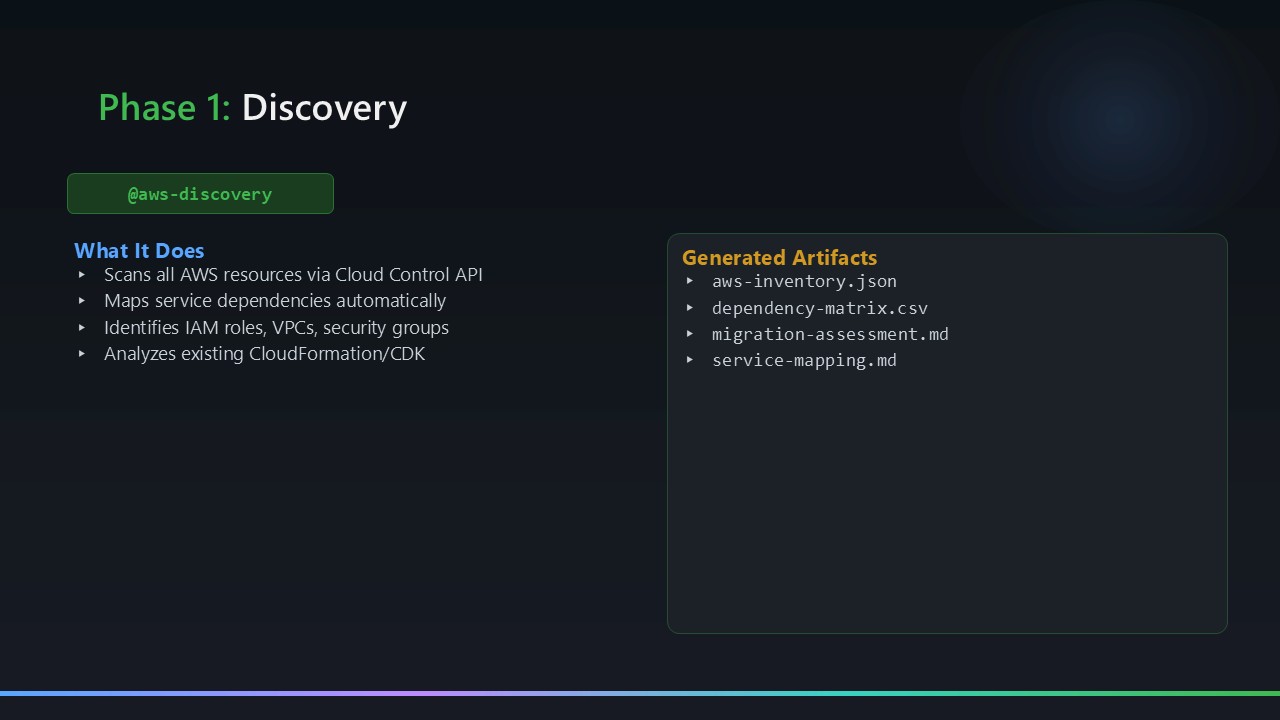
The @aws-discovery agent performs read-only enumeration of a live AWS account using the AWS Cloud Control API MCP server. No CLI, no scripts — just MCP tool calls inside the agent context window. It scans all enabled regions and produces four output artefacts:
| Artefact | What it contains |
|---|---|
aws-inventory.json | Complete resource list: every resource type, region, ARN, and metadata |
architecture-diagram.mmd | Mermaid diagram of the AWS topology (services, connections, tiers) |
dependency-matrix.csv | Service dependency relationships (e.g., Lambda → S3, Lambda → API GW) |
migration-assessment.md | Complexity ratings and effort estimates per service |
cloudformation-template.yaml | Captured CloudFormation stack template for direct conversion |
The decision to use MCP instead of CLI was deliberate. CLI commands require credentials configured on the host machine, produce unstructured text output that agents need to parse, and aren’t portable across operating systems. MCP gives the agent structured JSON responses directly, keeps the agent logic clean, and works identically on any platform where VS Code runs.
If you don’t have the AWS Cloud Control API MCP server configured, there’s an alternative: @aws-discovery-skills, which uses a built-in SKILL.md that defines a comprehensive CLI-based discovery workflow as a fallback. That agent uses no MCP servers at all — it drives discovery entirely through AWS CLI commands via the execute tool.
MCP tools declared in aws-discovery.agent.md:
1
2
3
4
tools:
  - aws-api-mcp-server/*   # AWS Cloud Control API — full resource enumeration across all regions
  - aws-knowledge-mcp/*    # AWS service documentation lookups
  - azure-mcp/search       # Azure region and service availability checks
The
@aws-discoveryagent is strictly read-only. It makes zero write calls. The agent instructions explicitly prohibit any mutation operations.
Phase 2: Architecture Design
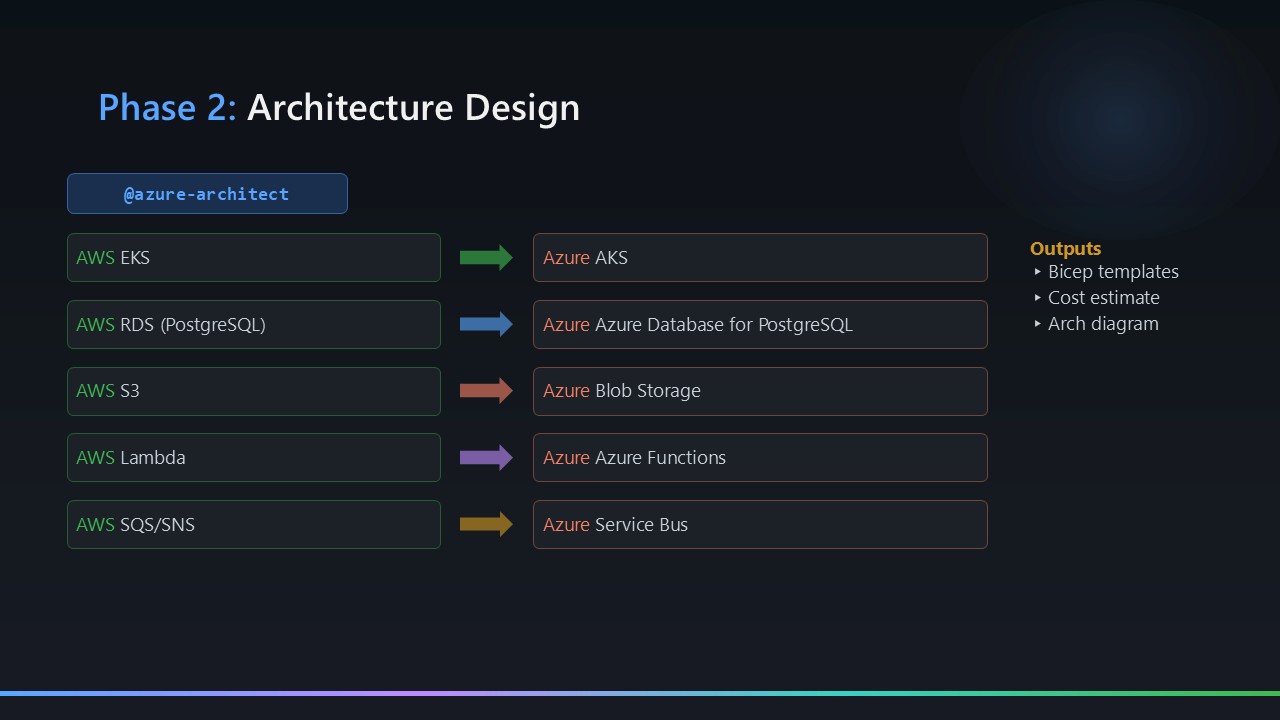
The @azure-architect agent reads the Phase 1 artefacts and produces a complete Azure architecture design. It uses the Microsoft Learn MCP server to validate service equivalents against current documentation and the Mermaid Chart MCP server to generate and syntax-validate diagrams.
The design document covers 11 sections — service mapping, network topology, security posture, identity model, cost comparison, HA/DR strategy, and deployment approach. The key outputs are:
design-document.md— the full architecture narrativearchitecture-diagram-azure.mmd— Mermaid diagram of the target Azure topologyservice-mapping.md— explicit AWS → Azure service equivalence tablecost-comparison.md— rough cost modelling for the target architecture
MCP tools declared in azure-architect.agent.md:
1
2
3
4
5
6
7
8
tools:
  - aws-knowledge-mcp/*                                          # AWS service docs (source-side mapping)
  - microsoftdocs/mcp/*                                          # Microsoft Learn — Azure docs + AVM modules
  - azure-mcp/documentation                                      # Azure service documentation
  - azure-mcp/search                                             # Azure resource/service search
  - mermaidchart.vscode-mermaid-chart/get_syntax_docs            # Mermaid syntax reference
  - mermaidchart.vscode-mermaid-chart/mermaid-diagram-validator  # Validates every .mmd file before writing
  - mermaidchart.vscode-mermaid-chart/mermaid-diagram-preview    # Previews rendered diagrams inline
The three
mermaidcharttools come from the Mermaid Chart VS Code extension — not a remote MCP server. The agent uses them to validate every diagram it generates before writing the.mmdfile to disk.
Phase 3: Parallel Execution
Phase 3 runs three agents concurrently. Each has a specific input/output contract and writes to its own output folder, so there are no interference risks.
3a — IaC Transformation: CloudFormation → Bicep
The @iac-transformation agent converts the captured CloudFormation template to modular Azure Bicep using Azure Verified Modules (AVM) where available. The output follows a consistent structure regardless of the source workload:
1
2
3
4
5
6
7
8
9
10
11
outputs/bicep-templates/
  main.bicep              # Subscription-scoped root module
  modules/
    <resource-a>.bicep    # One module per logical resource group
    <resource-b>.bicep
    ...
    rbac.bicep            # Always generated — Managed Identity RBAC assignments
  parameters/
    dev.bicepparam
    staging.bicepparam
    prod.bicepparam
The exact modules generated depend on the AWS resources discovered in Phase 1 — the agent reads aws-inventory.json and service-mapping.md to determine which Azure services are needed. The agent uses the Microsoft Learn MCP server to look up current AVM module references during generation — no hardcoded module versions.
MCP tools declared in iac-transformation.agent.md:
1
2
3
4
tools:
  - aws-knowledge-mcp/*   # AWS CloudFormation service and resource docs
  - microsoftdocs/mcp/*   # Microsoft Learn — AVM module references and Bicep docs
  - azure-mcp/*           # Full Azure MCP access (resource info, service lookups)
3b — Code Refactor: AWS SDKs → Azure SDKs
The @code-refactor agent re-writes AWS application code to Azure equivalents while preserving 100% of the business logic. It works on Python and Node.js source files — no IaC changes. The two things it always addresses, regardless of the source workload:
Identity: AWS uses IAM execution roles; Azure uses System-Assigned Managed Identity with RBAC. The agent replaces all AWS SDK credential patterns with DefaultAzureCredential — zero credentials in environment variables or code.
SDK mapping: AWS SDK calls are replaced with their Azure SDK equivalents based on the service mapping produced in Phase 2. The aws-knowledge-mcp and microsoftdocs/mcp servers are used during refactoring to look up both sides of each mapping and ensure API parity.
MCP tools declared in code-refactor.agent.md:
1
2
3
4
5
6
7
tools:
  - aws-knowledge-mcp/*                          # boto3 API docs — source SDK reference
  - microsoftdocs/mcp/*                          # azure-storage-blob and azure-identity SDK docs
  - ms-python.python/getPythonEnvironmentInfo    # Inspect local Python virtual environments
  - ms-python.python/getPythonExecutableCommand  # Locate the correct Python 3.11 executable
  - ms-python.python/installPythonPackage        # Install azure-* packages into .venv
  - ms-python.python/configurePythonEnvironment  # Set interpreter path for the workspace
The
ms-python.python/*entries are VS Code Python extension tools, not external MCP servers. They let the agent manage the local virtual environment directly without shelling out raw CLI commands.
3c — Pipeline Builder: GitHub Actions with OIDC
The @pipeline-builder-agent generates GitHub Actions workflows for each deployment surface discovered in Phase 2 — infrastructure (Bicep), application code, and any static assets. The generated pipelines always follow the same non-negotiable pattern:
- Authentication: OIDC / Workload Identity Federation throughout — no client secrets, no expiry dates, no rotation
- IaC deployment:
az deployment sub validate→ what-if (surfaced as a PR comment) → deploy - Application deployment: build → package → deploy → smoke test → rollback job on failure
- Environment gates: dev auto-deploys; staging requires 1 reviewer; prod requires 2 reviewers
The agent reads the Phase 2 architecture design and Phase 3a Bicep output to determine the correct deployment scopes, resource names, and trigger paths — the pipeline YAML is always tailored to the specific workload, not generated from a static template.
MCP tools declared in pipeline-builder-agent.agent.md:
1
2
tools:
  - azure-mcp/search   # Looks up Azure service names, regions, and resource IDs for workflow config
Phase 4: Deployment Validation
The @deployment-validation agent runs a 15-point static validation checklist across all generated artefacts from Phases 1–3:
- Bicep template syntax (via
az bicep build) - AVM module version pinning
- Environment parameter completeness
- Managed Identity — no hardcoded credentials
- RBAC scope correctness — least privilege
- Key Vault soft-delete and purge protection
- Storage — public blob access disabled
- GitHub Actions OIDC — no stored client secrets
- Smoke test coverage (HTTP trigger endpoints)
- AWS→Azure functional parity (resource-by-resource)
- Application Insights instrumentation
- Python 3.11 runtime declared (not 3.12/3.13)
staticwebapp.config.jsonrouting rules present- Dependency-matrix cross-referenced against Bicep outputs
- Azure Policy compliance (naming conventions, tagging)
The output is outputs/validation-report.md — a structured report with pass/fail status per check plus remediation notes for any failures. The sample migration ran 15/15.
This agent has no MCP tools declared. It works entirely from artefacts already on disk — no network calls, no MCP server dependency. That makes validation fast and reliable regardless of MCP server availability.
The Orchestrator: @migration-project-manager
If the four phases are the engine, the @migration-project-manager is the icing on the cake. It’s the agent that turns a collection of capable specialists into a single automated pipeline you can trigger with one prompt.
1
@migration-project-manager Run the full migration pipeline for AWS account <your-account-id>
That’s it. One prompt. The project manager then:
- Invokes
@aws-discovery— waits for all five artefacts to appear inoutputs/aws-migration-artifacts/before proceeding - Invokes
@azure-architect— waits fordesign-document.md,architecture-diagram-azure.mmd,service-mapping.md, andcost-comparison.mdbefore proceeding - Invokes
@iac-transformation,@code-refactor, and@pipeline-builder-agentin parallel — all three run concurrently since they write to separate output folders with no shared state - Invokes
@deployment-validation— only after all three Phase 3 agents have completed and their artefacts are verified
At each boundary, the orchestrator reads the output folder and verifies the expected artefacts exist before calling the next agent. If something is missing, it surfaces a clear blocker to the user rather than letting a downstream agent run against incomplete inputs.
Throughout the run, it maintains a live task plan at outputs/migration-task-plan.md — a structured Markdown file that logs phase status, completed tasks, and any blockers. This is what feeds the Visualizer dashboard.
MCP tools declared in migration-project-manager.agent.md:
1
2
3
4
5
6
tools:
  - read     # reads artefact files to verify phase completion
  - edit     # writes and updates outputs/migration-task-plan.md
  - agent    # delegates to all specialist agents
  - search   # searches the outputs/ folder for artefacts
  - todo     # tracks in-progress tasks
Notice what’s not in that list: no MCP servers whatsoever. The orchestrator has deliberately zero external dependencies. It reads files, delegates to agents, and verifies outputs. All the real work — and all the MCP server calls — happens inside the specialist agents it invokes. This is intentional: a lightweight coordinator should never be blocked by an unavailable MCP server.
You can also start from a specific phase if a previous run partially completed:
@migration-project-manager Resume from architecture phase. The agent will re-verify existing artefacts and pick up from the correct point.
The Visualizer: A Live Migration Dashboard
The repository ships with a Vite-powered single-page web app that gives you a real-time view of migration progress.
1
2
3
4
cd visualizer
npm install
npm run dev
# Opens at http://localhost:5173
It reads outputs/migration-task-plan.md (maintained by the orchestrator agent during a live run), renders phase cards with status badges, lets you open any generated artefact in the browser directly, and renders the AWS and Azure Mermaid diagrams side-by-side. A 30-second auto-refresh countdown keeps it live as agents are running.
Design Principles: The Decisions That Matter
Agents Don’t Use CLI — They Use MCP
Every agent in this framework uses MCP servers for data access, not shell commands. This keeps agents portable (no OS assumptions), keeps output structured (JSON, not unstructured text), and keeps the agent logic clean (no regex parsing of CLI output).
The MCP servers in use:
| MCP Server | Used by | Purpose |
|---|---|---|
| AWS Cloud Control API MCP | @aws-discovery | Read-only AWS resource enumeration |
| AWS Knowledge MCP | @aws-discovery, @azure-architect, @code-refactor | AWS service documentation |
| Microsoft Learn MCP | @azure-architect, @iac-transformation, @code-refactor | Azure docs and AVM references |
| Azure MCP | @azure-architect, @iac-transformation, @deployment-validation | Live Azure resource information |
| Mermaid Chart MCP | @azure-architect | Diagram generation and syntax validation |
Managed Identity Replaces All IAM Keys
AWS IAM roles and access keys are replaced — unconditionally — by Azure System-Assigned Managed Identity with fine-grained RBAC. The code refactor agent instructions explicitly prohibit any storage account keys or connection strings in the refactored output. The deployment validation agent checks for this as part of its 15-point checklist.
Bicep Is Subscription-Scoped
Rather than resource-group-scoped templates (which require the resource group to pre-exist), the generated Bicep uses subscription scope. The main.bicep creates the resource group as part of the deployment. This makes the templates genuinely self-contained: a fresh subscription is sufficient to run a full deployment.
Agent Instructions Encode the Hard-Won Lessons
The agent instruction files in .github/instructions/ are not just descriptions of what to do — they explicitly encode what not to do, based on real-world migration experience. Common pitfalls like runtime version constraints, reserved environment variable names, routing requirements for static hosting, and API equivalency gaps are all captured in the instructions so agents avoid them automatically. You don’t have to discover these the hard way — the agents already know.
What Lives in the Agent Instructions
The agent instruction files (.github/instructions/) are where the real intellectual property of this framework lives. Each phase agent has a corresponding instruction file that goes well beyond “here’s what to do” — it explicitly encodes what not to do, which edge cases to handle, and which Azure service constraints to be aware of.
For example, the code refactor instructions cover things like Azure compute runtime version constraints, reserved environment variable names that conflict with the host, and the correct identity-based patterns to use for Azure SDK calls. The IaC instructions cover AVM module selection criteria, subscription scope vs resource group scope trade-offs, and parameter file conventions. The architecture instructions explicitly call out which Azure services are optional gateway layers versus required platform components.
None of this knowledge is hardcoded into the agents themselves — it lives in the instruction files, which means you can update them as Azure evolves, as new AVM modules ship, or as your organisation’s standards change. The agents inherit the updated knowledge on the next run without any code changes.
The instruction files in this repo reflect real-world migration experience. If you adapt this framework for your own organisation, treat the instruction files as the primary place to encode your own standards, naming conventions, and architectural guardrails.
Key Takeaways
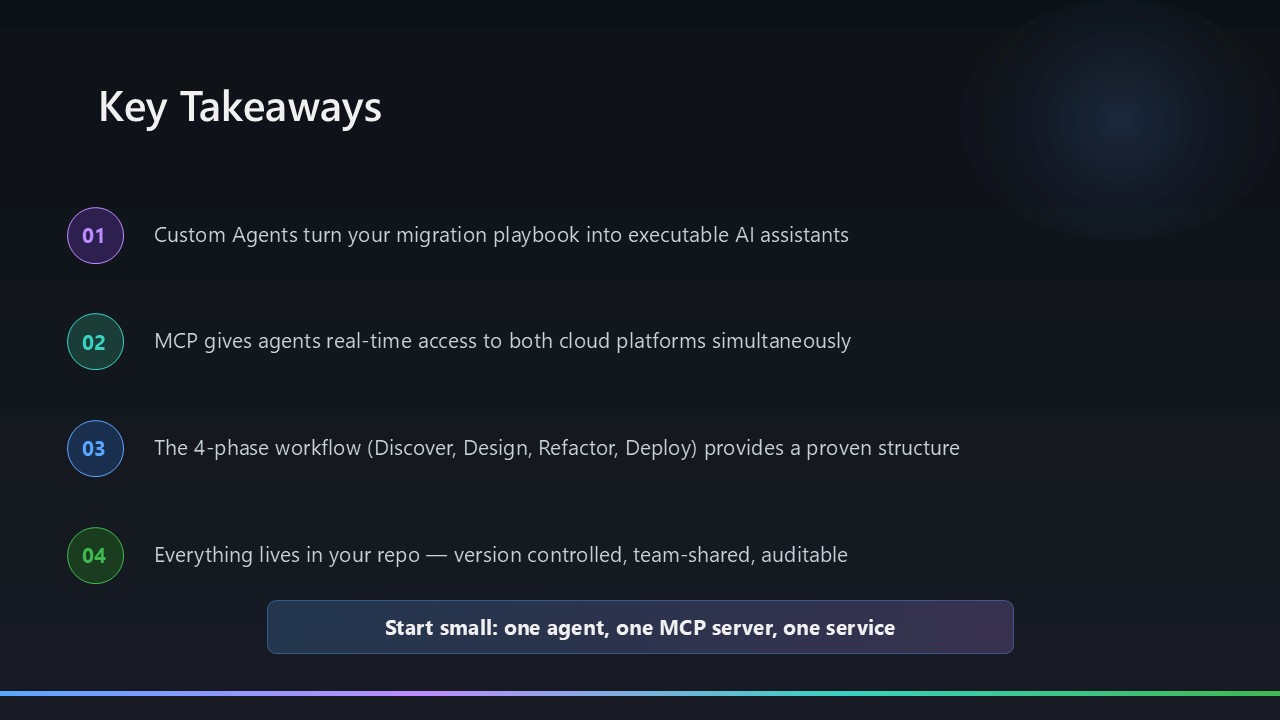
The framework is available on GitHub and is fully open. The agents are defined as .agent.md files in .github/agents/, backed by .instructions.md files in .github/instructions/. The Sample-Migrations/ folder contains a complete worked example — an AWS serverless image upload service (4 Lambda functions + S3 + API Gateway + CloudFormation) migrated end-to-end to Azure.
A few things I’d emphasise for anyone thinking about using or adapting this framework:
The instruction files are the primary asset. The agents themselves are generic — what makes them produce consistent, correct output is the instruction files. Getting those right took real iteration. When you adapt this framework, the instruction files are where your organisation’s standards, naming conventions, and architectural guardrails belong.
MCP quality drives output quality. The Microsoft Learn MCP server pulling current AVM module references during Bicep generation is what makes the IaC output actually usable. If your MCP servers are stale or unavailable, agent output degrades. Keep your MCP server connections healthy.
Parallelism in Phase 3 works because of output contracts. IaC, code refactor, and pipeline builder each write to distinct output folders with no shared state. The orchestrator verifies all three sets of artefacts before Phase 4 begins — if any agent short-circuits, the validation phase doesn’t run against incomplete inputs.
Validation is non-negotiable. The 15-point checklist catches things that slip through even careful manual review — RBAC scope drift, missing Key Vault protections, security policy gaps, artefact inconsistencies across phases. Run it on every migration, every time.
Hope this will help someone in need — whether you’re planning a migration or just thinking about how to structure multi-agent AI workflows for complex engineering tasks. The full framework and sample migration are in the GitHub repository linked above.
Feel free to reach out if you have any questions. Until next time…!