Azure Application Gateway Gets JWT Validation – What It Means for Your Apps
Howdy Folks,
Microsoft just dropped a major update for Azure Application Gateway: native JSON Web Token (JWT) validation (currently in Public Preview). This means you can now enforce authentication for your web APIs and apps at the edge, before requests even hit your backend. No more custom code, no more relying solely on backend validation – the gateway does it for you!
Why Is This a Big Deal?
Traditionally, Application Gateway handled SSL/TLS termination, routing, and WAF, but left authentication to your backend. With JWT validation, you can:
- Block unauthenticated or invalid requests before they reach your app
- Simplify your backend code (no more token parsing in every service)
- Align with Zero Trust principles by enforcing identity at the perimeter
- Propagate verified identity info downstream via headers
A Story of Two Gateways: Application Gateway vs API Management
Let me take you back to a time when API security in Azure meant one thing: API Management (APIM). For years, APIM was the go-to for JWT validation, claims extraction, and policy-driven API protection. You’d set up a validate-jwt policy, extract claims, and use them to make routing or authorization decisions. It was powerful, flexible, and—let’s be honest—a bit heavy for simple edge authentication.
But what if you just wanted to block unauthenticated traffic at the very edge, before it even touched your API gateway logic?
Enter Application Gateway’s new JWT validation. Now, you can enforce authentication before requests even reach APIM or your backend. This is a game-changer for layered security and Zero Trust architectures.
How Does APIM Handle JWTs?
APIM is still the king of API-centric scenarios. It lets you:
- Validate JWTs from any provider (not just Entra ID)
- Extract claims and use them in policies (for example, to route requests, enforce quotas, or inject headers)
- Transform, enrich, or even rewrite tokens
- Apply fine-grained authorization logic based on claims, scopes, or roles
Example: You might extract a tenantId or role claim from the token and use it to route to different backends, or to throttle requests per user or tenant. APIM’s policy engine is incredibly flexible for these scenarios.
Code Placeholder:
Where Does This Leave APIM?
APIM is not going anywhere. In fact, the two now work even better together:
- Use Application Gateway to block unauthenticated/invalid requests at the edge
- Let APIM handle advanced API management, claims-based routing, and policy enforcement
This layered approach means less noise for APIM, better performance, and a stronger security posture.
What About Claims Offloading?
In the past, many teams used APIM to “offload” claims from the JWT—extracting them and injecting them as headers for downstream services. This was super useful for legacy backends that couldn’t parse tokens themselves.
With Application Gateway’s JWT validation, you get a new pattern: the gateway injects the x-msft-entra-identity header after successful validation. This header contains the tenant and object ID, but not all claims. If you need more claims (like roles, custom attributes, etc.), APIM is still your best bet for extracting and forwarding them.
Key Point:
Application Gateway is about authentication at the edge. APIM is about API management, transformation, and deep claims logic. Use both for the best of both worlds.
The Big Picture: A Modern, Layered Security Story
Imagine this flow:
- Application Gateway: Validates JWT, blocks unauthenticated traffic, injects identity header
- API Management: Performs advanced claims extraction, authorization, transformation, and routing
- Backend: Receives only trusted, pre-validated traffic, with all the context it needs
This layered approach means:
- Fewer bad requests reach your APIs
- Simpler, more secure backends
- Clear separation of concerns
- Easier compliance and auditing
Highlight:
- Application Gateway JWT validation is for edge authentication (fast, simple, Entra ID only)
- APIM is for deep API management, claims logic, and multi-provider scenarios
- Use both for Zero Trust, defense-in-depth, and modern cloud architectures
Real-World Scenario: Securing Enterprise Apps and Partner Access
Let me paint a picture of where this really shines: enterprise applications and B2B partner scenarios.
Imagine you’re running a large enterprise with multiple web APIs and services accessed by your employees, contractors, and business partners. You’re using Microsoft Entra ID for identity management—your employees sign in with their corporate accounts, and partners use B2B guest access or federated identities.
Now, here’s the challenge: You want to protect your APIs from unauthenticated traffic at the very edge, but you don’t want to burden your backend services with token validation logic. You also want a layered security approach where bad actors can’t even reach your API Management or backend services.
Enter Application Gateway JWT validation.
Here’s how it works in this scenario:
- User signs in via your app using Entra ID (corporate account, B2B guest, or federated identity)
- Entra ID issues a JWT with claims like
oid(user object ID),upn(user principal name),roles, and custom claims - User’s app sends requests to your API via Application Gateway with the JWT in the Authorization header
- Application Gateway validates the JWT at the edge:
- Checks signature, issuer, audience, and expiration
- Blocks invalid or missing tokens immediately (401/403)
- Injects
x-msft-entra-identityheader with tenant and user ID
- Request reaches APIM or backend only if the token is valid, with identity context already attached
Key Point: This approach is perfect for enterprise and B2B scenarios where you want to secure workforce and partner apps with minimal backend overhead and maximum edge protection.
Why This Matters for Enterprise Scenarios
Entra ID is designed for workforce and B2B scenarios—corporate authentication, role-based access, and secure partner collaboration. By combining it with Application Gateway JWT validation, you get:
- Edge authentication that blocks bad traffic before it costs you compute time
- Identity propagation to your backend without custom token parsing
- Zero Trust enforcement at every layer
- Scalability for thousands of employees and partners without backend bottlenecks
Important Note: As of this preview, Application Gateway JWT validation only supports tokens from standard Microsoft Entra ID (workforce) tenants. It does not currently support Entra External ID (CIAM) tenants for customer-facing apps. For customer scenarios, you’ll still need to handle JWT validation in APIM or your backend.
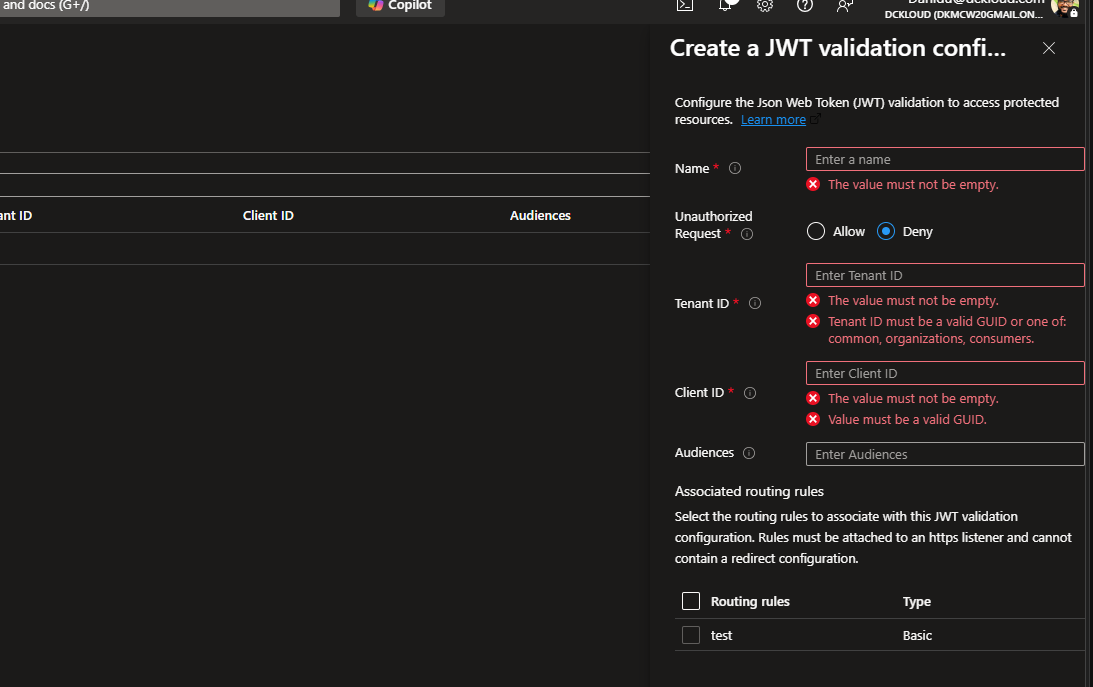
How Does It Work?
When enabled, Application Gateway validates JWTs issued by Microsoft Entra ID (formerly Azure AD) in incoming HTTPS requests. If the token is valid, the request is forwarded to your backend with an x-msft-entra-identity header. If not, the gateway blocks the request (401/403).
Key Capabilities
- Token Validation: Signature, issuer, tenant, audience, and lifetime
- Identity Propagation: Adds
x-msft-entra-identityheader - Flexible Actions: Deny (401) or Allow (forward without identity header) for invalid tokens
- Multitenant Support: Supports common, organizations, and consumers tenants
- HTTPS Only: Feature requires HTTPS listeners
Prerequisites
- Application Gateway SKU: Standard_v2 or WAF_v2
- HTTPS listener (TLS/SSL certificate configured)
- Azure Resource Manager API version 2025-03-01 or later
- Outbound connectivity to login.microsoftonline.com (TCP 443)
- Web API registered in Microsoft Entra ID (workforce tenant)
Important: Currently only supports tokens from standard Entra ID (workforce) tenants. Entra External ID (CIAM) is not yet supported.
Step-by-Step: Enabling JWT Validation
- Register your API in Microsoft Entra ID
- Get your Client ID and Tenant ID
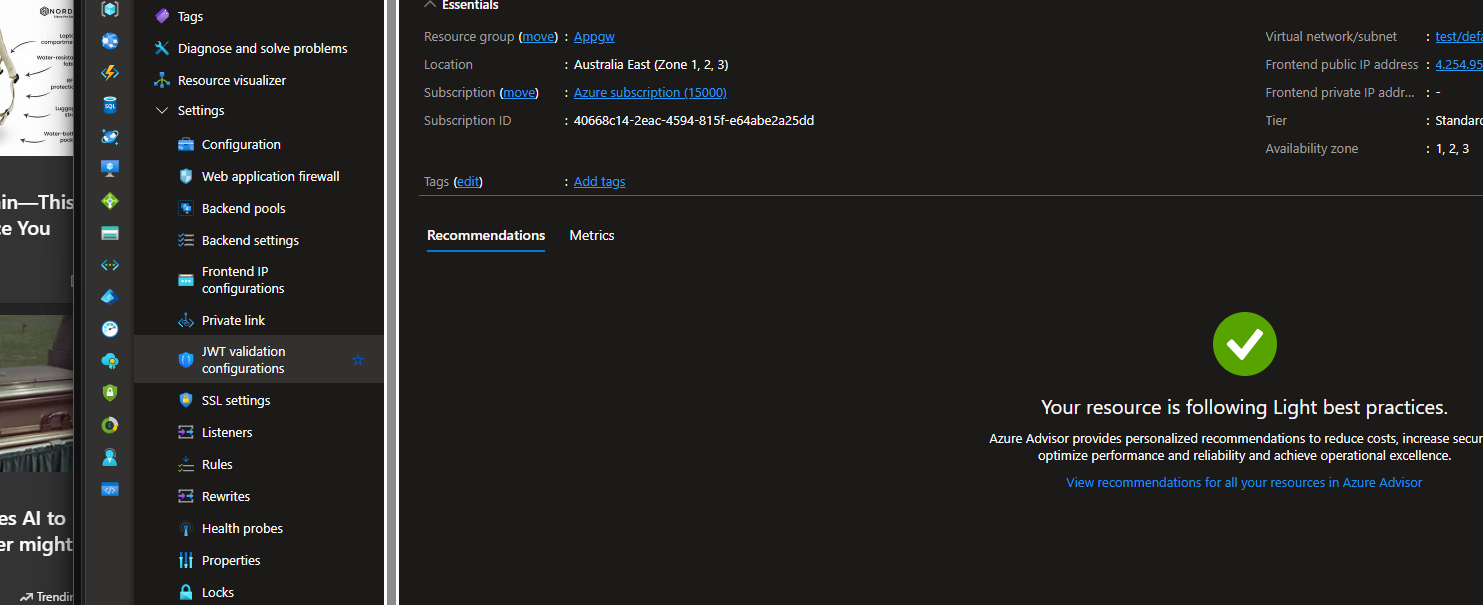
- Configure JWT validation in Application Gateway
- Go to the preview config portal
- Fill in JWT policy details (name, tenant, client ID, audience, action)
- Associate the policy with a routing rule
- Ensure HTTPS listener is used
- Link the JWT validation config to the rule
Screenshot Placeholder:
What Does a Valid Request Look Like?
- Client sends request with
Authorization: Bearer <token> - Gateway validates token
- Backend receives request with
x-msft-entra-identityheader
| Scenario | HTTP Status | Identity Header | Notes |
|---|---|---|---|
| Valid token, action=Allow | 200 | Present | Token validated, identity forwarded |
| Invalid token, action=Deny | 401 | Absent | Gateway blocks request |
| Missing token, action=Deny | 401 | Absent | No Authorization header |
Missing oid claim, action=Deny | 403 | Absent | Critical claim missing |
Code Placeholder:
Troubleshooting
If you get 401/403 responses:
- Check Tenant ID and Audience match your config
- Ensure token is not expired
- Confirm Authorization header is present
- Make sure JWT validation is attached to the correct listener/rule
- Check Application Gateway access logs for details
Limitations & Notes
- Preview: Not recommended for production workloads yet
- Microsoft Entra ID only: Tokens must be issued by standard Entra ID (workforce tenants)
- Entra External ID not supported: CIAM scenarios with external tenants are not currently supported
- Stateless: No session/cookie state maintained
- Zero Trust: Each request must present a valid token
Final Thoughts
This update is a huge step toward modern, secure, and simplified cloud architectures. By offloading authentication to the gateway, you reduce backend complexity and strengthen your security posture. Keep an eye out for GA and expanded features!
References:
- Official Microsoft Docs: JWT validation in Application Gateway
- Microsoft Entra ID overview
- Zero Trust security principles
Let me know in the comments if you’ve tried this feature or have questions!